 Broadband Provisioner®
Broadband Provisioner® is a broadband access and configuration management platform that offers network service providers a unified approach to subscriber management. Built on a set of hardened core provisioning engines, Broadband Provisioner® simplifies subscriber authentication by presenting a role-based authentication model using a powerful domain membership system.
This package contains a wide array of features for Service Providers and Multiple Service Operators, including enhanced support for broadband networks operating over HFC/CATV and FTTH/FTTN.
Standards Compliance
Broadband Provisioner® is compliant with more than 50 IETF standards, as well as standards from the Cablelabs® Consortium and various other entities. This list is not exhaustive, as new standards are added regularly.
IETF Standards
- RFC 951, Bootstrap Protocol
- RFC 1350, The TFTP Protocol
- RFC 2131, Dynamic Host Configuration Protocol
- RFC 2132, DHCP Options and BOOTP Vendor Extensions
- RFC 2241, DHCP Optios for Novell Directory Services
- RFC 2242, Netware/IP Domain Name and Information
- RFC 2347, TFTP Option Extension
- RFC 2348, TFTP Blocksize Option
- RFC 2349, TFTP Timeout Interval and Transfer Size Options
- RFC 2485, DHCP Option for the Open Group's User Authentication
- RFC 2563, DHCP Option to Disable Stateless Auto-Configuration in IPv4 Clients
- RFC 2610, DHCP Options for Service Location Protocol
- RFC 2865, Remote Authentication Dial-In User Service (RADIUS)*
- RFC 2937, The Name Service Search Option for DHCP
- RFC 3004, The User Class Option for DHCP
- RFC 3011, The IPv4 Subnet Selection Option for DHCP
- RFC 3046, DHCP Relay Agent Information Option
- RFC 3074, DHCP Load Balancing Algorithm
- RFC 3164,The BSD Syslog Protocol
- RFC 3256, The DOCSIS® Device Class DHCP Relay Agent Information Sub-option
- RFC 3315, Dynamic Host Configuration Protocol for IPv6
- RFC 3361, DHCPv4 Option for SIP servers
- RFC 3397, DHCP Domain Search Option
- RFC 3442, The Classless Static Route Option for DHCPv4
- RFC 3495, DHCP Option for CableLabs Client Configuration
- RFC 3527, DHCPv4 Link Selection Suboption for the Relay Agent Information Option
- RFC 3736, Stateless DHCP Service for IPv6
- RFC 3825, DHCP Option for Coordinate-based Location Configuration Information
- RFC 3925, Vendor-Identifying Vendor Options for DHCPv4
- RFC 3993, Subscriber-ID Suboption for the DHCP Relay Agent Option
- RFC 4014, RADIUS Suboption for the DHCP Relay Agent Information Option
- RFC 4174, The IPv4 Option for Internet Storage Name Service
- RFC 4243, Vendor-Specific Information Suboption for the DHCP Relay Agent Option
- RFC 4280, DHCP Options for Broadcast and Multicast Control Servers
- RFC 4388, DHCPv4 Leasequery
- RFC 4578, DHCP Options for the Intel Preboot Execution Environment (PXE)
- RFC 4649, DHCPv6 Relay Agent Remote-ID Option
- RFC 4702, DHCPv4 Client Fully Qualified Domain Name Option
- RFC 4704, DHCPv6 Client Fully Qualified Domain Name Option
- RFC 4776, DHCPv4 and DHCPv6 Option for Civic Addresses Configuration Information
- RFC 4833, Timezone Options for DHCP
- RFC 5007, DHCPv6 Leasequery
- RFC 5010, The DHCPv4 Relay Agent Flags Suboption
- draft-ietf-dhc-failover-12,The DHCPv4 Failover Protocol
Cablelabs® Standards
- ANSI/SCTE 22-1 2002
- CM-SP-RFIv1.1-C01-050907
- SP-CMTRI-I01-970804
- CL-SP-CANN-I01-070119
- CL-SP-CANN-DHCP-Reg-I01-070119
Features
- Hardened for un-trusted public access networks
- Domain provisioning model
- Online re-configuration
- Multi-platform
- OSS integration
- Scalability
- Clustering / Load balancing
- ACID transactions
- Supports millions of subscribers
- SQL queries
- Plugin architecture for customizations
- Dynamic DOCSIS® configuration file generation
- Auto-provisioning
- Self-provisioning
- Standards compliant
- Full support for IPv6
- Runtime expression evaluation
- Auditing
- Web-based management
- Role-based operator login
- Event publishing
- Event triggers
- Load balancing for external network services
- High availability*
- Reporting*
Supported Platforms
- Debian Linux 12, x64
System Requirements
See Installation
Installing
See Installation
Registering your product
When you first start the user interface, Broadband Provisioner® will ask you to activate your product. If you are deploying the product yourself, mail your activation code to info at broadbandprovisioner.com to receive a product serial number, otherwise obtain the serial number from your local support representative.
System Architecture
Domains
Broadband Provisioner® uses a domain system for provisioning the devices on your network. A domain is simply a logical grouping to which resources and device accounts are assigned. An easy way to understand how domains work is to view a domain as a partition in the server's configuration. Two different devices having identical properties on your network, but belonging to different domains, may "see" Broadband Provisioner® as having two completely separate configurations.
By tailoring the domain classifications for your network, Broadband Provisioner® allows you to:
- group similar classes of devices
- provision devices in bulk by provisioning the domain itself
- provision single devices through device-specific domains
- re-provision devices by moving them between domains
- provision devices into multiple domains to provide for different device roles
- partition the server for MSO environments
Resources
A 'resource' is anything that Broadband Provisioner® is configured to manage. Resources are carefully guarded by the server, and provisioned for use by devices on your network using a system of domain memberships.
Examples of resources include:
- Address pools
- Address bindings
- Network pools
- Network bindings
- DHCP policies
- TFTP policies
Provisioning Overview
Address Provisioning
Address provisioning is what happens when Broadband Provisioner® decides which IP address a device can use. When a device first boots in your network, Broadband Provisioner® classifies the device, associates it with one or more domains, then determines which address pools are available to the domain(s) with which the device is associated. Although the device's domain membership determines the set of pools available, additional checks may limit this set of pools based on the network topology and other factors.
After the device has obtained its address, it must periodically extend the lease on that address. If the binding and the pool belong to domains to which the device has access, the lease can be extended. If, however, the device has been moved to a different domain, the lease cannot be extended. In this case the device may attempt to get another address from a different pool.
DOCSIS® Cable modem provisioning
The Cablelabs® Data-Over-Cable-Service-Interface-Specification, DOCSIS®, defines a standard whereby a modem operating over cable-tv cabling can support a TCP/IP network. Broadband Provisioner® fully supports DOCSIS cable modems by being able to automatically classify new cable modems on your network, assign them to domains, lease them addresses and build dynamic configuration files that configure all aspects of the modem.
Provisioning a cable modem takes place in two steps: first the modem receives an IP address, and second it receives a configuration file dictating its operating parameters, including settings such as upstream and downstream bandwidth and quality of service.
Cable modems can be automatically provisioned by configuring the DHCP server to first recognize the new devices as a cable-modem, then to assign the device to a domain that delivers the necessary DHCP options for the modem to download its configuration file. Once the cable modem has a working IP address, the TFTP server identifies the cable modem and proceeds to build and deliver a DOCSIS configuration file for the device.
Fiber modem provisioning
Most fiber modems, like every other device on your network, require an IP address to operate.Broadband Provisioner® can manage the IP addresses of every fiber-modem on your network, and can provision DHCP options to fiber modems using the same account/domain model that's used for your other network devices.
Some fiber modems also support the ability to download a configuration file over TFTP. For these modems, Broadband Provisioner® can be configured to easily manage the modem configurations by simply moving the modem accounts into and out of a domain. Modem configuration files are dynamically generated based on the domains to which the subscriber belongs.
Automatic Provisioning
Broadband Provisioner® can be configured to automatically classify new devices when they first come online. You can use site-specific logic to probe for information about the new device and, based on the results, classify the new device into one or more domains.
See the individual module references for details about configuring automatic provisioning.
Self Provisioning
A self-provisioning system is one in which the subscriber actively chooses the services to which he or she wishes to subscribe. Broadband Provisioner® ships with a rich web-services gateway that can be used to easily implement a web-based self-provisioning system.
The web-services gateway is covered in detail the Web-Services reference section.
Manual Provisioning
Manual provisioning can be tedious for human operators. To manually provision a new device:
- create a new account for this device
- creating access controls mapping the account to one or more domains
For more information on manual provisioning, see the section covering the web-services gateway.
Expressions
The expression syntax in Broadband Provisioner® provides unlimited flexibility for configuring devices on your network. Instead of simply defining static values, expressions allow you to calculate values at runtime using many different criteria.
You can supply expressions in many places where you would normally use a literal value. For example, instead of defining option '12, Hostname' as a literal string, you can write an expression that generates a unique host name from information the device sent to the server.
You can use expressions in the following places:
- Anywhere you define a DHCP option value
- In the auto-provision domains list when calculating domains to which new machines should belong
- In the TFTP virtual root folder, access mode and overwrite mode
- In the syslog triggers
Refer to the individual protocol engine references for a complete description of the expression syntax.
Login
To log into the system, open your web browser and enter 'http://localhost:5005' in the location bar. If this is a first-time installation, the user name is 'admin', and the password is 'admin'.
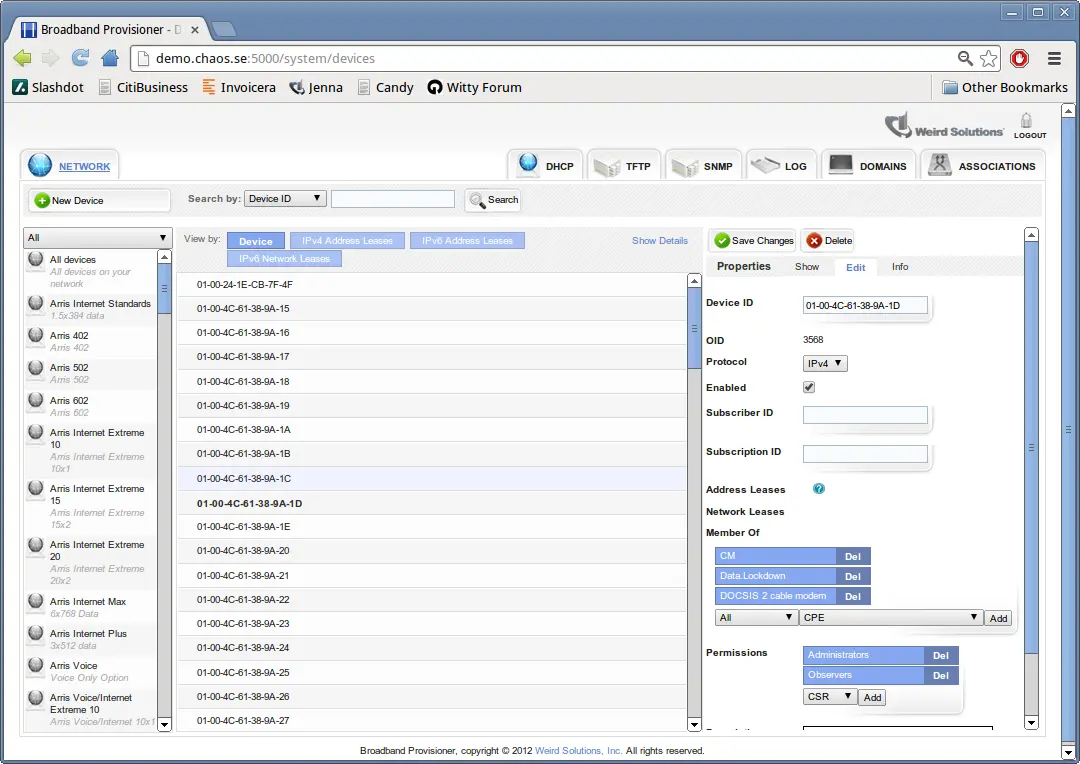
After login, you are presented with the main interface for managing your server. This interface can be used to add and remove address pools, device accounts, option policies, users, and much more.
DHCP Reference
Address Pools
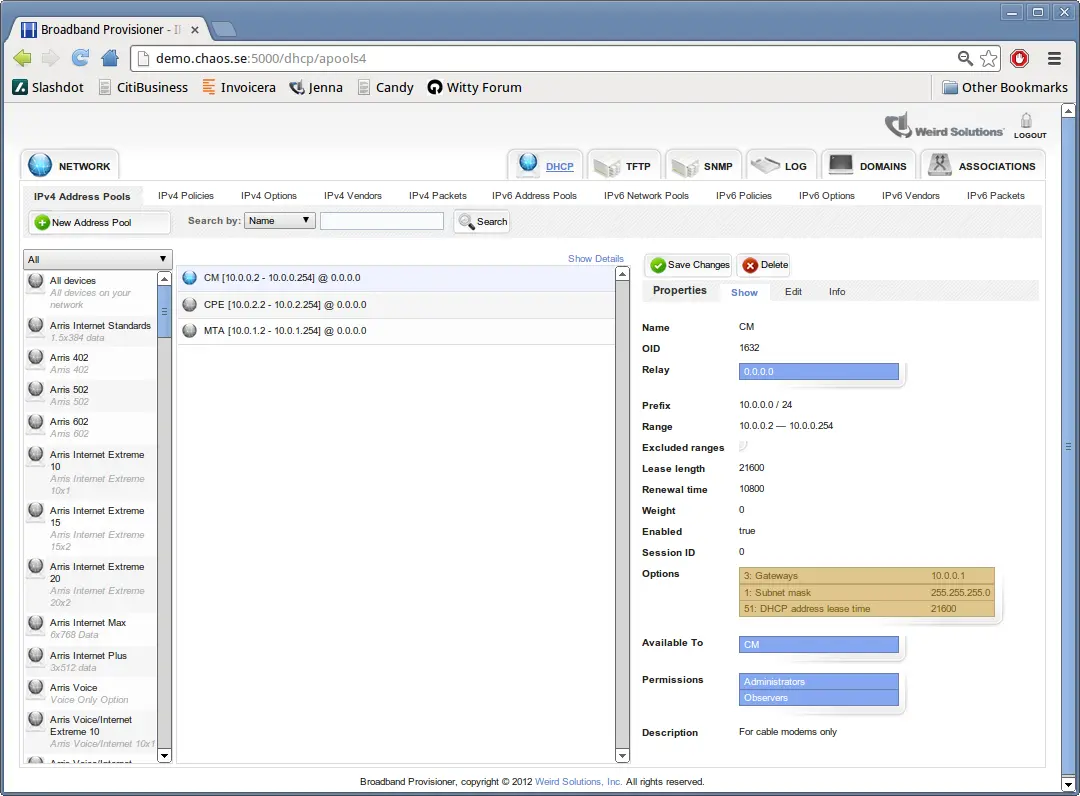
An address pool is a resource that identifies a range of addresses that the server can lease to your devices. This is the primary means of automatically managing the IP addresses on your network.
To create an address pool, choose File->New->Address Pool in the user interface.
include::dhcp/address_pool_fields.txt[]
For each pool there is also a pool-specific policy that can hold configuration information specific to the network on which this pool resides. The most common use of the pool-specific policy is to define the 'Gateways' option (default gateway).
The server chooses a pool for a DHCP client device by using a four stage process of reduction.
. Find the relay agent address the client is booting through and search for all pools associated with that address. . Using the security access token assigned by the provisioner subsystem, discard pools the client doesn't have authorization for. . Check the Allow and Deny expressions for each pool. Discard pools that are disallowed by these expressions. . Of the remaining pools, choose the one with the highest weight that still has available addresses.
If a pool belongs to the All devices domain (the default), step 2 will not discard the pool. By moving the pool from the All devices domain to a more restricted domain you can effectively allow or deny access to the pool based on the domains to which the DHCP client belongs.
Dynamic Address Bindings
Dynamic address bindings are resources that are automatically created by the DHCP server using the information provided from your address pools. A dynamic address binding is a DHCP lease that allots an IP address to a specific device for a certain amount of time.
A dynamic address binding contains these fields:
| Field | Description |
|---|---|
| Client identifier | The unique device identifier |
| Fixed | This setting is false for dynamic bindings |
| IP address | The leased address |
| Commit time | The time at which this lease was last obtained or extended |
| Duration | The length of time this lease is valid |
| Relay | The relay agent the client booted through |
| Protocol | The specific protocol the client used to obtain this address lease |
| Pool | The name of the address pool used to create this lease |
| Trusted ID | An identifier for the device or circuit provided by the relay agent |
| Trusted ID type | The type of trusted identifier provided by the relay agent |
The DHCP server automatically associates dynamic address bindings with one or more domains. If a device is able to obtain a lease from an address pool, it will be able to extend the lease created from that pool as long as the device belongs to the same domain used to obtain the original lease.
Fixed Address Bindings
A 'fixed address binding' is a specific kind of DHCP lease that guarantees that the recorded IP address will always be associated with the device named in the lease. Once a fixed address binding is made, the DHCP server will never use the binding's address with another client until you delete the binding or convert it to a dynamic binding.
You can create fixed address bindings manually or you can convert a dynamic binding to a fixed binding. To convert a dynamic binding to fixed, simply change the Fixed field in the binding to +true+.
When creating a fixed address binding you must specify the relay agent address to be associated with the binding. You can create different bindings for the same device on different network segments by specifying different relay addresses.
The following fields are not required when creating a fixed address binding:
- Commit time
- Protocol
- Pool
- Trusted ID
- Trusted ID type
❗ A fixed address binding is not required to be associated with any address pool. It is a perfectly acceptable configuration to create fixed bindings without having any address pools.
Network Pools
Network pools are an emerging IPv6 standard and are currently under development.
Dynamic Network Bindings
Network bindings are an emerging IPv6 standard and are currently under development.
Fixed Network Bindings
Network bindings are an emerging IPv6 standard and are currently under development.
DHCP Options
DHCP options are operational settings that the DHCP server can distribute to devices on your network. The system is pre-configured with a wide array of IETF-standard DHCP options, as well as a set of 'Control Options' that can alter the DHCP server's runtime behavior. In addition, the system allows you to define your own site-specific options.
DHCP options are defined in a policy, address pool or network pool.
Because policies belong to domains, it's easy to provision a set of DHCP options to a device: simply associate the device account with the domains that contain the policies the device should use.
Suppose you have two geographical domains, 'Charlotte' and 'Atlanta', and the policies
belonging to these domains specify different DHCP option values. A device that belongs
to the 'Charlotte' domain would receive a different set of DHCP options than
a device that belongs to the 'Atlanta' domain.
Of course, a network device may belong to as many domains as you require, so you are free to mix and match domains to suit your provisioning model. Having Class-of-Service domains combined with geographical domains is one approach.
Assigning a device to a domain isn't the only way to provision DHCP options. Each option has an associated value, and that value can be a literal, such as '192.168.1.1' or it can be an expression that's dynamically calculated based on criteria you choose. For example, the "TFTP server" option could be calculated as:$RELAY.ADDRESS() + 1. This expression simply assumes that the address of a client's closest TFTP server is the next address in sequence after the relay agent's address.
Server Control Options
The DHCP server recognizes a set of 'Control Options' that are not standard DHCP options. These options can be used to control various aspects of the DHCP server's behavior. Control Options are never transmitted to a device.
To define a Control Option in a policy or pool, select the 'Server Control' class of options, then add the option you require.
Control Options can be defined in any resource that accepts standard DHCP options. If a device on your network uses a policy or pool that contains a Control Option, the DHCP server will alter its behavior for that device according to the option setting.
.For Example
The Control Option 'DDNS update server' can be used to specify that a dynamic
DNS update be directed to a specific DNS server on your network. If this option is
defined in a policy, devices that use the policy will have their DNS updates sent
to the DNS server defined in this option. Devices not using this policy will have
their DNS updates sent to the system default DNS server.
Vendor-specific options
Vendor-specific options are a special class of DHCP options that are specific to a particular kind of device, model or vendor. The system supports a range of vendor-specific options, and new options can be easily added.
For DHCPv4, you can add a vendor-specific option to a policy by first adding the Class Identifier option and setting its value to anything that matches the vendor class. You can then add vendor-specific options to the policy.
When using vendor-specific options in DHCPv4, only one class of vendor-specific options can be added to any given policy. The system does not support adding vendor-specific options from different vendors to a single DHCPv4 policy.
For DHCPv6, you can add a vendor-specific option to any policy you deem appropriate. Multiple kinds of vendor-specific options can be added to a single policy, but a device will only receive the vendor-specific options that it is capable of understanding.
Policies
A DHCP policy, which is simply a collection of DHCP options, is the primary means for giving a device extra configuration settings. A policy can hold any number of DHCP options, and any number of policies can be applied to a given device. There are two basic kinds of policies: Enforced and Optional.
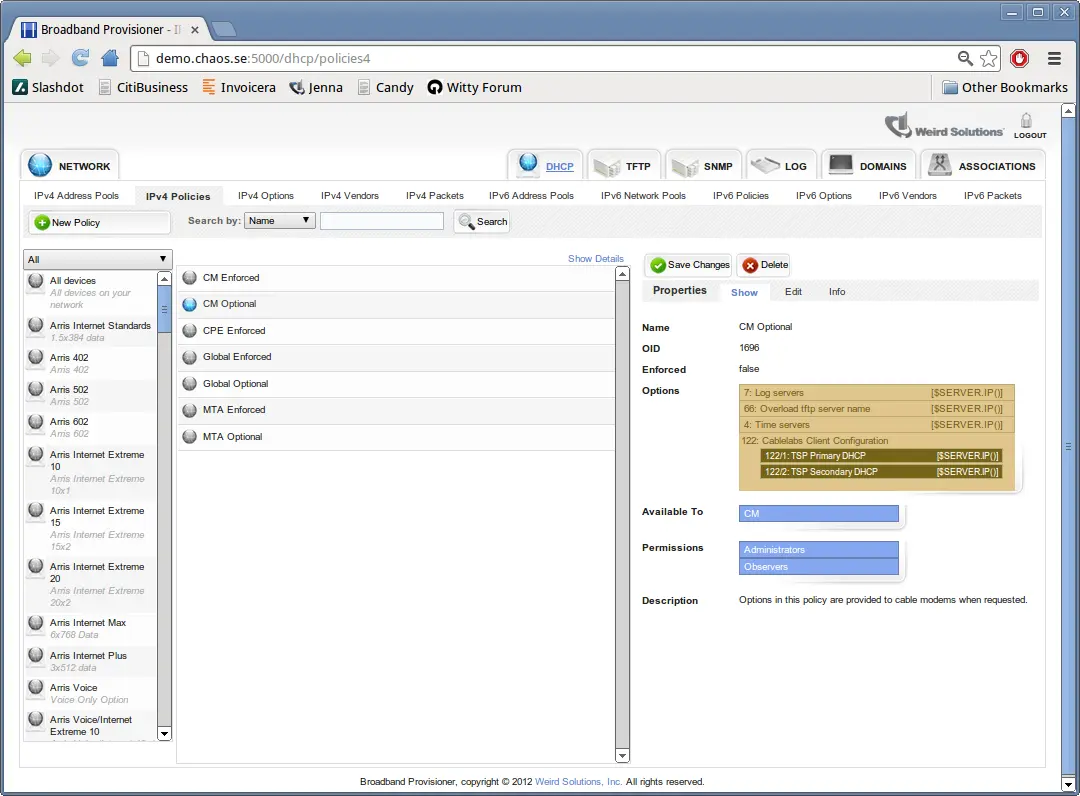
When a DHCP client device contacts the server, the provisioner module determines the domains the device belongs to, and the DHCP engine uses this information to locate all policies for the device.
For every enforced policy applicable to the device, the DHCP server provides the device with 'every option' in all enforced policies.
Devices are only provided with options from optional policies when the device explicitly requests values for those options.
Every domain you create with the web-based interface has one enforced policy and one optional policy. Having these two policies associated with the domain creates a set of common response options for devices using this domain, with certain options only provided when asked for.
For example, suppose you do the following:
- Create a domain named 'Cablemodems'
- Insert option 4, 'Time servers' into the domain's enforced policy and set an appropriate value
- Insert option 6, 'Domain name servers' into the domain's optional policy and set an appropriate value
With this configuration, every will be given the 'Time servers' option, but only cable modems that request the 'Domain name servers' option will receive that information.
Since policies are associated with domains, it's straightforward to cause a device to receive one set of options or another by moving the device account between domains.
Option Types
Option types are 'declarations' of DHCP options. They are not actual options, merely descriptions of options the server should be prepared to encounter. Option types specify a full range of details for DHCP options, including the tag number, data type, value limits, etc.
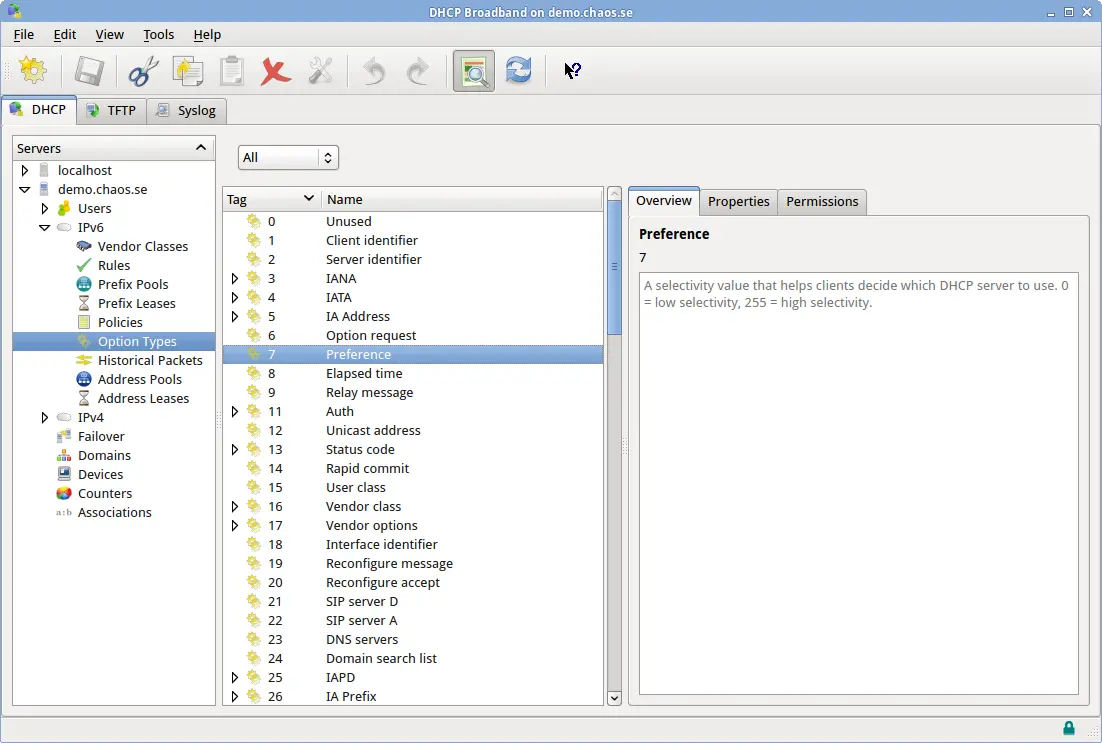
For every DHCP option the server receives there should be a corresponding Option Type that describes the option. If the DHCP server receives a packet that contains an unknown option, processing for that option is skipped.
Option types are quite complex because they describe in detail the complete characteristics of DHCP options. The fields of an option type are described below, with descriptions for each field.
| Field | Description |
|---|---|
| tagpath | The option's unique tag. For many options this may simply be a number, but for options that must be encoded inside other options this will be a path of option tags such as +43/1+. |
| type | One of the predefined option type names. Type names are listed in the table below. |
| name | The official name of the option |
| class | An arbitrary name for grouping similar options |
| description | A human-readable description for this option |
| user_definable | Whether or not a user can set a value for this option. Can be +allowed+, +disallowed+ or +required+. |
| max_instances | An integer specifying the maximum number of instances of this option that can be defined. 0 means unlimited. Default is 1. |
| default_value | A string representing the default value for this option, if there is one. The default value is used by the user interface when presenting the operator with a suggested value for this option. |
| arrayed | A boolean value indicating whether or not more than one element can exist in the option. The default is false. |
| unit | A string representing the unit of measurement for this option value. This text is displayed for operators when editing option values. |
| signed | A boolean value for numeric types that indicates whether or not the elements are signed. The default is false. |
| null_terminated | A boolean value for string types indicating whether or not to use a null terminator on binary output. The default is false. |
| min_value | An integer value for numeric types that specifies the minimum allowed value this option may hold. |
| max_value | An integer value for numeric types that specifies the maximum allowed value this option may hold. |
| input_type_encoding_value | An integer specifying whether this option has a type field. This input setting is used when reading the option from raw binary format. If this value is -1 (the default), this option does not have a type-encoding field. A value of 0 or greater indicates that this option a specific type encoding, and the specified value denotes the type. Type encodings are option-specific. |
| output_type_encoding_value | An integer specifying whether this option has a type field. This output setting is used when writing the option to raw binary format. If this value is -1 (the default), this option does not have a type-encoding field. A value of 0 or greater indicates that this option a specific type encoding, and the specified value denotes the type. Type encodings are option-specific. |
| fixed_offsets | This field is for fixed_offset type options only. It specifies a set of offsets where each contained tag should be found. The format is +tag/offset/width+ (where +width+ is in bytes), and multiple offsets are separated with a comma. |
| vendor_id | An integer representing the IANA-registered vendor ID. When non-zero, this number indicates to any subencoded options that their metadata is specific to this vendor. The default value is 0, which indicates that any subencoded options are not vendor-specific. |
| vendor_oro | A boolean value indicating whether this option defines a vendor-specific option-request-option (ORO). A vendor-specific ORO is used by a DHCP client to request a specific set of options from a DHCP server. |
| context_vendor_id | This option is used to indicate to the DHCP server that another option in the packet currently being processed holds information about the vendor identifier that should be used when reading suboptions of this option. |
| len_prefix_width | An integer that specifies whether each element in this option should be preceeded with a length field of this size (in bytes). The default value of 0 indicates that option elements are not length prefixed. |
| subtag_width | An integer value for options that hold options which specifies the width of the tag field for suboptions. The default value is the same as the DHCP protocol being used. |
| sublen_width | An integer value for options that hold options which specifies the width of the len field for suboptions. The default value is the same as the DHCP protocol being used. |
| subtype_width | An integer value for options that hold options which specifies the width of the type field for suboptions that are type-encoded. The default value is the same as the DHCP protocol being used. |
An option may be declared as one of the following types:
| Name | Description |
|---|---|
| 8bit | An 8 bit integer value |
| 16bit | A 16 bit integer value |
| 24bit | A 24 bit integer value |
| 32bit | A 32 bit integer value |
| 64bit | A 64 bit integer value |
| 128bit | A 128 bit integer value |
| string | An ASCII string |
| ipaddress | An ip address |
| ip_endpoint | An ip endpoint (ip:port) |
| boolean | An 8 bit boolean value |
| time | A 32 bit time value |
| byte_sequence | A sequence of arbitrary bytes |
| subencoded | An option that can hold child options |
| topencoded | An option that can hold top-level options |
| dnsname | An RFC 1035 DNS name |
| expression | An expression that evaluates to a value at runtime |
| control | A DHCP protocol-control option |
| fixed_offset | An option that holds child options that are not tag/len/data encoded |
| varbind | An snmp variable binding. This may also be written as +snmp_oid+. |
Vendor Classes
Vendor classes are a convenient way of organizing the different kinds of devices that may appear on your network.
DHCP packets typically contain information that describes the kind of device communicating with the server. Instead of writing an expression to fully analyze all possible combinations of a DHCP packet, you can call the $DEVICE.TYPEID() function. This function returns a number that indicates the exact type of device communicating with the server.
The $DEVICE.TYPEID() function uses vendor classes to determine the type of device that is requesting DHCP service.
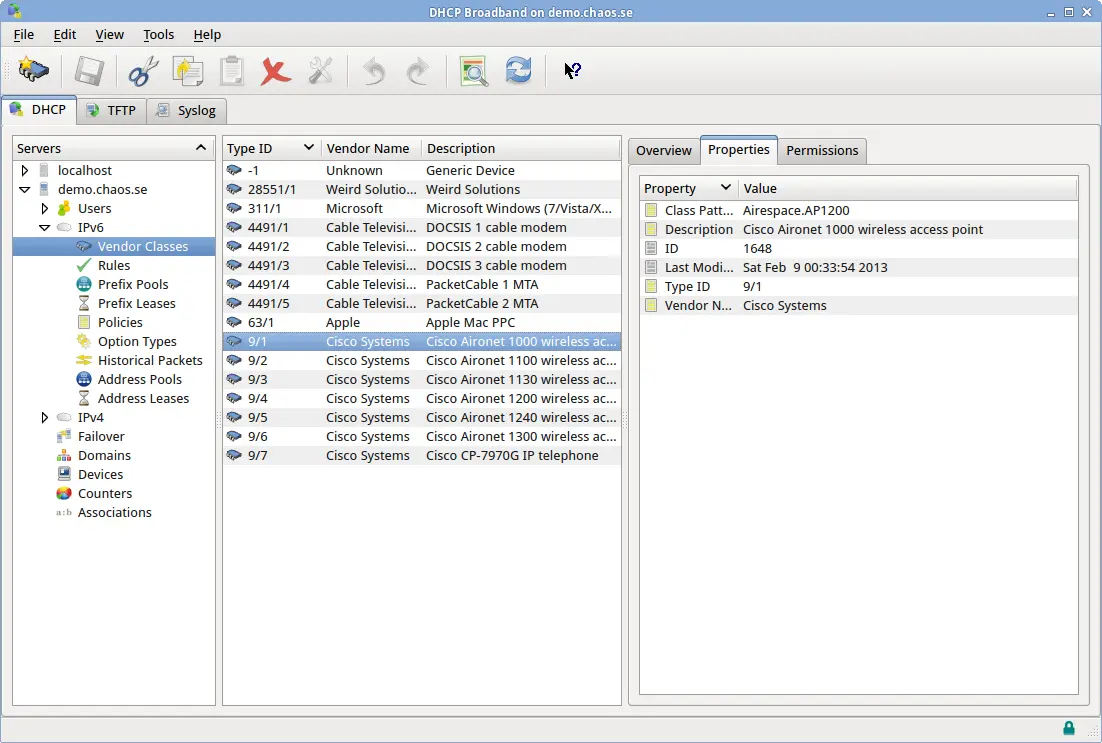
The DHCP server package ships with vendor-specific definitions for a few common devices, but more vendor classes can be added at any time.
A vendor class object (and the corresponding definition file) contains these fields:
| Field | Description |
|---|---|
| vendor_id | A 'numeric path', where the first element is the IANA-assigned enterprise identifier |
| for this vendor, followed by one or more numbers (assigned by Weird Solutions) that represent | |
| this specific device model. | |
| vendor_class | A string that is used to match the vendor class received from the client (DHCPv4 option 60 or |
| DHCPv6 option 16/2). For example, if a client sends a vendor class with the text "kazoo", and | |
| there is a vendor class matching this text, the device is assumed to be manufactured by that | |
| vendor. | |
| vendor_name | The full name of the vendor that manufactures this equipment. Used for display purposes when |
| viewing network devices. | |
| description | A description for this vendor. Used for display purposes. |
Choosing a vendor_class value ^^^^^^^^^^^^^^^^^^^^^^^^^^^^^ The vendor_class field is the most important part of a DHCPv4 vendor class definition. This is because the text in this field determines how the server identifies the device, and consequently determines whether or not the server is capable of reading device-specific options (option 43 suboptions).
Wildcards can be used to match text in the vendor class field, but you should take care not to make the wildcards match too loosely. For example, if one kind of device sends a vendor class of "kazoo" and another kind of device sends "kazam", having a wildcard entry for kazoo with the text "ka*" would inadvertently match two kinds of devices to one vendor.
You can use the asterisk (*) and question mark (?) characters for wildcard matching. Asterisk matches multiple characters, whereas the question mark matches one character only.
IANA Enterprise Identifiers ^^^^^^^^^^^^^^^^^^^^^^^^^^^ IANA enterprise identifiers (EIDs) are unique numbers that are assigned to organizations worldwide by the Internet Assigned Numbers Authority. The IANA website is http://www.iana.org.
The DHCP protocol uses IANA enterprise identifiers to represent specific vendor options. The DHCP server adds further qualifiers to IANA enterprise numbers to denote specific kinds of devices from a single manufacturer. These qualifiers have the form 'EID/subid'.
How vendor classes relate to options ^^^^^^^^^^^^^^^^^^^^^^^^^^^^^^^^^^^^ Some subencoded options such as DHCPv4 option 43 and DHCPv6 option 17 can contain suboptions that are specific to a particular vendor. When the server receives a packet that contains option 43, for example, it must be able to figure out which vendor's options are encoded in the payload.
The server does this by simultaneously holding information about many vendor's options. Vendor's options are defined in the files found in the oinc4 and oinc6 directories.
When a vendor-specific option (VSO) such as DHCPv4 option 43 is encountered, the server decides what vendor class the device belongs to by matching the option 60 value against a vendor class record, and then looking for vendor-specific options having that vendor identifier. For DHCPv6, the vendor identifier is encoded directly in the VSO option, so the vendor can be immediately identified without an intermediate lookup.
For example, it's entirely reasonable to declare two options having tagpath 43/1: one option having vendor id 28551, the other having vendor id 35/1. When parsing a received packet, the server will decide which option declaration is appropriate based on the vendor id it used to classify this device.
Historical packets
The DHCP server can be configured to store historical DHCP packets. The data contained in these stored packets can be used in response to lease queries, by the GUI (for displaying additional device information) or by an expression that computes a current value based on historical information.

Configure historical packet collecting in the System tab of the user interface, or by using the +ipv4.dhcpv4.pktstore.packet_types+ (DHCPv4) or +ipv6.dhcpv6.pktstore.packet_types+ (DHCPv6) settings in the DHCP configuration file. The server stores only the most recent packet of each type for each client. So for example, if the server is configured to store DHCP +discover+ packets, the historical packet table will contain one +discover+ packet for each client the DHCP server has serviced.

Some packet types can be used in more than one context with the DHCP protocols. The DHCP +ack+ packet, for example, can be sent in response to a +request+ or an +inform+. Because of this ambiguity, the server can be configured to store only those +ack+ packets that are responses to +request+ packets by specifying the packet type as +request/ack+. Any combination of packet types can be specified, but in practice (because of how the DHCP protocols work) only a few combinations will actually occur.
Packet types that can be collected for DHCPv4:
- discover
- offer
- request
- ack
- inform
- decline
- release
- nak
- force-renew
- lease-query
- lease-unassigned
- lease-unknown
- lease-active
- bootp-request
- bootp-reply
Packet types that can be collected for DHCPv6:
- solicit
- advertise
- request
- confirm
- renew
- rebind
- reply
- release
- decline
- reconfigure
- info-request
- relay-forward
- relay-reply
- lease-query
- lease-query-reply
Statistics and Counters
The DHCP server maintains hundreds of counters for its internal operations, and it periodically samples and stores these counters for historical analysis.

System counters are sampled every 60 seconds by default, but this value can be overriden on a per-protocol basis using the following configuration settings:

ipv4.dhcpv4.stats.sample_rate = 60
ipv6.dhcpv6.stats.sample_rate = 60
By default, system samples are stored for a maximum 30 days, but this value can be overriden on a per-protocol basis using the following configuration settings:
ipv4.dhcpv4.stats.retention_age = 30:::
ipv6.dhcpv6.stats.retention_age = 30:::
The retention age value is formatted as days:hours:minutes:seconds, so 30::: is 30 days, 0 hours, 0 minutes and 0 seconds.
See the documentation for the command line interface for information on how to select counter samples and calculate statistics.
Pendings
A 'pending' represents the transition stage from a free address to a valid binding. When a client requests a new address, the address is first stored as a pending and offered to the client.
If the client later accepts the address, a binding is created and the pending is deleted. If the client refuses the address, the pending is immediately deleted.
Pendings cannot be directly viewed through the user interface, but they can be viewed through the command line interface with the +select/insert/update/delete+ commands.
Pendings have a valid lifetime of ten (10) seconds, but this can be changed with the configuration setting shown below:

ipv4.dhcpv4.engine.pendings.max_age = 5
ipv6.dhcpv6.engine.pendings.max_age = 5
The DHCP server periodically purges pendings that have expired due to lack of acknowledgement.
Event Notifications
The DHCP server can be configured to notify external services when internal events occur. This external notification operates over the UDP protocol and is handled by the UDP Publisher plugin.
On startup, the UDP publisher reads a list of event subscribers from a configuration file and starts publishing events to those subscribers. The subscribers file consists of a set of subscriptions, where each subscription includes a destination ip:port (on which the subscriber must be listening) as well as a set of event classes the subscriber is interested in.
The UDP publisher is configured through the main configuration file with the settings shown here:
udp_publisher.latency = 300:: The publisher latency setting states how long the UDP publisher thread will collect events before publishing to the subscribers
udp_publisher.max_history = 500:: The max history setting controls the total number of historical events that can be held. Events older than this are discarded.
udp_publisher.subscribers.file = udp_subscribers.txt:: The subscribers file is an ascii file that lists every subscriber.
The default subscribers file is +udp_subscribers.txt+, and it's located in the application's var dir. (/var/lib/dhcptd, /var/dhcptd or the Windows program folder)
A sample UDP subscriber file is:
notifies of changes to configuration, domains and policies
endpoint=10.0.0.1:5400 classes=config,domain,policy
notifies of all changes except configuration
endpoint=10.1.2.20:5500 classes=*,!config
If no classes are specified, or the wildcard symbol (*) is specified, the subscriber will be notified of all server events. Receiving all event notifications from a loaded server can be taxing on both the DHCP server and the subscriber. This configuration should be avoided if possible.
The following table shows the classes of events that can be published from the UDP publisher:
| Class | Description |
|---|---|
| * | All events |
| subscription | Any change to a udp subscriber's state |
| config | Any change to the application's configuration settings |
| domain | Changes to a domain |
| account | Changes to an account |
| access_control | Changes to an access control |
| keyvalue | Changes to a key/value pair |
| statistic | Changes to a statistic |
| apool | Changes to an address pool |
| npool | Changes to a network pool |
| abinding | Changes to an address binding |
| nbinding | Changes to a network binding |
| apending | Changes to an address pending |
| npending | Changes to a network pending |
| policy | Changes to a policy |
| option | Changes to an option type |
| vendor_class | Changes to a vendor class |
| packet | Changes to a historical packet |
| alease | Changes to an address lease |
| nlease | Changes to a network lease |
| sql_query | Changes to an sql query |
| sql_query_group | Changes to an sql query group |
| capability | Changes to a system capability |
This next table lists the verbs, or operations that may accompany an event:
| Type | Description |
|---|---|
| add | A new object has been added |
| del | An object has been deleted |
| modify | An existing object has been modified |
| obtain | A new lease has been obtained (alease/nlease class only) |
| renew | A client has renewed a lease (alease/nlease class only) |
| release | A client has released a lease (alease/nlease class only) |
| expire | A lease has expired (alease/nlease class only) |
| decline | An offer for a lease has been declined (alease/nlease class only) |
| purge | An existing lease has been purged from the system (alease/nlease class only) |
Permanent Subscriptions ^^^^^^^^^^^^^^^^^^^^^^^ All subscribers listed in the udp_subscribers file are permanent subscribers. The server will continue to publish events to these subscribers even if the network indicates that the subscriber is not listening.
Temporary Subscriptions ^^^^^^^^^^^^^^^^^^^^^^^ A temporary subscription can be made through the command line interface. Temporary subscriptions are valid as long as the subscriber is receiving the server's event messages.
Event notification format ^^^^^^^^^^^^^^^^^^^^^^^^^ A subscriber will receive event notifications from the server over the UDP protocol to the ip:port listed in the subscription. Each packet received corresponds to one event, and uses an ASCII-based 'key=value' format. Multiple key/values are separated with a single newline character (+\n+).
A sample event from the DHCP server:
event_type=modify event_class=domain event_instance=My Domain event_time=Mon Jul 28 14:45:26 CEST 2008
Some events may contain more key/value pairs, but the pairs listed above are guaranteed to always be present in any event notification. The order of key/value pairs is not guaranteed, and may change in the future.
Lease Event or Binding Event? ^^^^^^^^^^^^^^^^^^^^^^^^^^^^^ Whether or not you should subscribe to +lease+ events or +binding+ events depends on the kind of activity you wish to receive notifications for.
A 'lease' event signifies that an exchange has occured between the DHCP server and a DHCP client, whereas a 'binding' event signifies that a change has occured in the written record of a lease. Consider the case where an operator creates a fixed binding: the record for this lease has been added, but there has not necessarily been an exchange between the server and the client.
You might assume that a lease event would always be followed by a binding event, but that may not be the case. It could be possible for the lease to change state in such a way as to not need a corresponding change to the binding.
Normally a binding event is generated any time a binding is modified, but there's one major exception to this: the DHCP engines. The engines operate at extremely high rates, and simply have not been burdened with triggering both lease events and binding events.
If you wish to receive notification about lease activities that are occuring on your network, subscribe to lease events. These events are directly triggered by the DHCP queries received from clients.
If, however, you wish to be notified of changes to bindings, you should consider subscribing to both lease events and binding events. The lease events will give you a good indication of whether a binding has been modified, but you'll also receive binding events that occur as a result of operator activity or address reclamation.
Lease Query
The system supports the DHCP Lease-query protocol for IPv4 and IPv6 networks. DHCP Lease-query is handled by the LeaseQuery plugin, therefore this plugin must be loaded for lease-query to work.
The lease-query module reports information about the server's leases to any device that supports the DHCP lease-query standard. The most common use for lease-query is for DSLAMs and CMTS:es to repopulate route and circuit information after the unit has rebooted.
You can use the following configuration settings to configure the DHCP server to only allow lease-queries from certain IP addresses. You can also state which options are allowed in a lease query.

Dynamic DNS
The DHCP server can be configured to perform dynamic DNS (DDNS) updates to your DNS server when a lease changes state. Dynamic DNS is handled by the DHCP-DDNS plugin, therefore this plugin must be loaded for dynamic DNS to function.
DDNS is supported by interpreting a set of control options. Since DDNS is configured with options, you can effectively provision DDNS updates using the domain provisioning model by placing different DDNS options in different policies. DDNS option values can also be expressions, so this form of provisioning is also avaliable.
Before configuring DDNS as described below, choose the policy you want to use for enabling DDNS. The global policy will enable DDNS for every address leased, whereas other policies can limit the scope of when DDNS updates are made.
Configuring DDNS for trusted clients ^^^^^^^^^^^^^^^^^^^^^^^^^^^^^^^^^^^^ If you trust the DHCP client(s) to supply a valid fully-qualified domain name and want the client-supplied domain name to be used when performing dynamic DNS, define these options in an applicable policy:
- option DDNS update server = +10.0.0.1+
- option DDNS update mode = +1+
- option DDNS update ttl = +300+
- option Reverse update zone = +"1.168.192.inaddr.arpa"+

.The example above:
- Updates the DNS server on address 10.0.0.1
- Uses a DNS TTL of 300 seconds
- Updates the foward lookup zone based on the domain name supplied by the DHCP client(s)
- Updates the reverse lookup zone for the 192.168.1.0 network
- Uses the host name supplied by the client
Configuring DDNS for untrusted clients ^^^^^^^^^^^^^^^^^^^^^^^^^^^^^^^^^^^^^^ If you 'do not' trust the DHCP client(s) to supply a valid fully-qualified domain name, define these options in the policy:
- option DDNS update server = +10.0.0.1+
- option DDNS update mode = +2+
- option DDNS update ttl = +300+
- option Reverse update zone = +"1.168.192.inaddr.arpa"+
- option Forward update zone = +"yourdomain.com"+
- option Hostname = +[ $STR ($HWADDR()) ]+
'for IPv6/DHCPv6, instead of +option Hostname+, use +option DDNS hostname+'

.The example above:
- Updates the DNS server on address 10.0.0.1
- Uses a DNS TTL of 300 seconds
- Updates the foward lookup zone "yourdomain.com"
- Updates the reverse lookup zone for the 192.168.1.0 network
- Generates a host name from the DHCP client's link-layer (MAC) address
Host names can be generated or looked up in a variety of ways using the DHCP server's expression syntax.
Device Classification Rules
The DHCP server can be configured to automatically execute a set of rules in order to classify the devices on your network. These rules can be executed every time a device contacts the server, or only the first time the device contacts the server.

When the DHCP server receives a request from a device on your network, it searches the Devices database to see if this device has an account in the DHCP server. If an account exists, the device is classified according to the settings in the account. If an account does not exist, the DHCP server executes all rules in priority order.
A rule contains a condition expression and a result expression. When executing a rule, the DHCP server first evaluates the condition. If the condition evaluates to 'true', the result expression is then evaluated. The result expression returns a list of domain names to associate with this device.
If any matching rule has the Persist flag set, a new account is created for this device, and the domains from every matching rule are saved with the account. If no matching rules have the Persist flag set, the device is classified into the the domains, but no device account is created. In this case, the device will execute the rules again the next time it contacts the server.
Although you can create rule expressions based on any criteria you want, a good general-purpose approach is to simply associate a new device with a domain explicitly reserved for devices of that type.
In other words, if you have one domain for fiber modems (FM) and one for cable modems (CM), you can create rules that associate fiber modems with the FM domain and cable modems with the CM domain.
The $DEVICE.TYPEID() function is particularly useful when creating rules that differentiate different kinds of devices. The system is pre-configured to recognize many different device types through Vendor Classes, and new device types can be easily added.
Permissions
The DHCP server uses a domain system for classifying the devices on your network. A domain is simply a logical grouping to which resources and accounts are assigned. An easy way to understand how domains work is to view a domain as a partition in the DHCP server's configuration. Two different devices having identical properties, but belonging to different domains, may "see" the DHCP server as having two completely separate configurations. In other words, domains can selectively enable the resources to which a device has access.
There are three standard domains available:
- Admin
- All users
- All devices
The Admin and All users domains are operator domains, used to grant system operators access to resources. The All devices domain is a device classification that refers to every device on your network.
Resources always belong to the Admin domain, and membership in this domain cannot be revoked. This membership gives administrators complete access to the resources managed by the system.
New resources belong to the All devices domain by default, but this membership can (and should) be revoked if the resource should not be available to every device on the network.
Address Manager
The DHCP server uses an address manager to cache free ip addresses and deliver them to the engines when needed. The address manager holds a high-speed cache for each pool you've defined, and maintains background threads that refill these caches as they're depleted.
Reclaimer ^^^^^^^^^ The reclaimer is the background subsystem in the DHCP server's address manager responsible for finding free IP addresses and delivering them to the address manager's cache. When a cache hits a 50% low-water mark, the reclaimer is signaled to start the process of finding free addresses with which to replenish the cache.

The reclaimer is multithreaded, which allows it to process multiple caches simultaneously.
In addition to processing cache requests on demand, the reclaimer can also be configured to purge expired bindings in order to "clean out" your database. This feature is known as a Global recall, and can be useful on transient networks where devices that leave the network are unlikely to reappear within a reasonable timeframe.
The +reclaimer.interval+ setting controls how often (in minutes) a 'global recall' is executed. The default setting is 0, which disables global recall.
[IMPORTANT] Global recall is not required or desired on stable networks where devices are unlikely to permanently disappear from your network.
The +reclaimer.min_inactive_days+ setting is an overriding value that specifies the minimum lease retention age. The address from an expired lease will not be recovered under any circumstances until the lease has been expired for this amount of time. A value of 0 means there is no minimum lease retention age.
The +reclaimer.lead_time+ dictates the minimum amount of time (in seconds) that must pass before a lease is considered expired. The address from a lease cannot be recovered before this time has passed.
The +reclaimer.lease_tolerance+ setting is a hint for how long the lease should be kept after expiration. It is expressed as a percentage of the original lease length. This value can be overriden by the reclaimer if there is an emergency shortage of available ip addresses.
The +reclaimer.markers.enable+ setting is a boolean value that instructs the reclaimer to remember, across application restarts, where in an address range it last searched for free addresses. Setting this value to true greatly reduces the amount of time needed initialize a pool cache when the DHCP server process is first starting, but may result in harmless gaps in leased addresses when the DHCP server process is restarted.
Destabilizing Dynamic Addresses
Some environments may want to ensure that a certain portion of the network's dynamically leased addresses be periodically relinquished regardless of the state of the DHCP client. This is referred to as 'destabilizing' addresses, and it's a common practice for providers that want to charge a customer for the privilege of obtaining a stable ip address.
Because the DHCP server is built on a security access model, destabilizing addresses is very straightforward. The approach is to simply issue an update command that updates a set of the dynamic bindings in the DHCP server, moving them all into a domain that is inaccessible to the clients.
For example, suppose we create a domain called No Access which has 0 members. We could destabilize the entire network by issuing this command through the command interface:
update_address_binding where=T.pk>0 AND T.fixed = 0 domains=No Access
In effect, this command denies all DHCP clients with dynamic addresses from renewing their existing leases. The server remembers the leases, and will not recycle the ip addresses until the lease has expired (or been released, if +ipvN.dhcpvN.engine.delete_on_release+ is in effect), but the leases will not be available for renewal. If the server is configured to be authoritative it will NAK the client when it tries to renew the lease, and the client will proceed to attempt to acquire a new address.
In practice you probably don't want to destabilize your entire network at once. Instead, your +update_address_binding+ command should use a +where+ clause that limits the update to a subset of dynamic bindings.
Failover Clusters
The DHCP server can be configured to synchronize data between multiple independent servers, allowing for up to 15 cooperating servers to act as a single cluster providing online backup and automatic redundancy. Changes to any server are automatically distributed to all other servers. In addition, where required, the servers can be configured to only synchronize specific types of changes.
In order to configure failover, each server must be assigned a unique index in the DHCP server's configuration file.
system.index = 0:: Each server in the cluster should have a unique index
❗ Synchronization requires that the remote console interface be available to all servers in the cluster.
Replication ^^^^^^^^^^^ The replication subsystem gathers realtime changes to the server into versioned changesets, stages them for later processing, and eventually processes them with background threads. Changesets are kept in standard text files, which allows a system administrator to easily review the activity occuring on a busy cluster.
The most straightforward configuration for a set of servers is for each server to have failover peer entries for every other server in the failover group. This is a full multi-way relationship that ensures maximum reliability, but it can generate a lot of extra synchronization traffic if you have many servers in the group.
Another approach is to designate a few servers as master servers, and have all other servers synchronize only with the master servers.
If a failover peer goes offline at any time, changesets are stored on the local server until the target comes back online. After the target is back online, all outstanding changesets are published to the target to bring it up to date.
⚠️ On a production server it is important to follow the steps below in order. Failure to do so may result in loss of data.
We assume the following:
- You have an existing production server
- You want to add a new backup server
- The software is installed and activated on the backup server
Steps:
. On the production server, add a new failover peer from the user interface by choosing File->New->Failover Peer... from the menu.
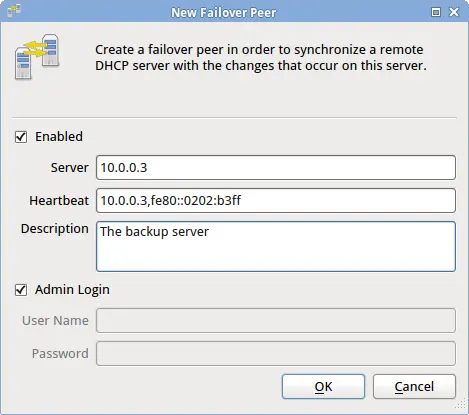
.. Ensure that 'Enabled' is checked .. Enter the remote server's host name or ip address .. Enter the remote server's ipv4 and (optionally) ipv6 addresses, separated with a comma. .. If the remote server has the same administrator password as the local server, leave 'Admin Login' checked .. Save your changes
The production server will now make a connection to the backup server and start a full resync. This resync can take a long time - possibly hours. Wait until the resync is complete before proceeding to the next step.
When resync is complete, connect to the backup server and add a new failover peer from the user interface by choosing File->New->Failover Peer... from the menu.
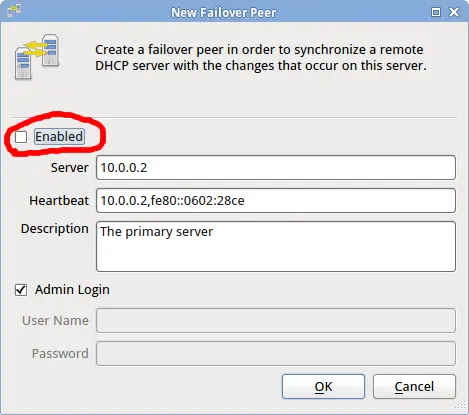
.. Ensure that 'Enabled' is unchecked .. Enter the production server's host name or ip address .. Enter the production server's ipv4 and (optionally) ipv6 addresses, separated with a comma. .. If the production server has the same administrator password as the backup server, leave 'Admin Login' checked .. Save your changes .. Select the newly saved failover peer and place a check mark by Enabled. .. Save your changes.
The backup server will now make a connection to the production server, but it will not initiate a resync.
At this point failover is active. Changes on one server may take up to sixty(60) seconds before appearing on the other server.
💡 The Classes setting specifies which types of changes to send to the failover peer. The default wildcard symbol (*) sends all changes. To specify a subset of changes, list the classes of interest separated by a comma. A class name that is preceeded with the exclamation symbol (!) indicates that specific classes should be excluded. System event classes are listed in the <<Event-classes-anchor,Event-classes>> table.
Heartbeat ^^^^^^^^^ The heartbeat subsystem maintains the current operating mode for every server in the cluster.
When the DHCP server process starts with the heartbeat module loaded, the DHCP server is placed in +init+ mode. The heartbeat module then queries all servers in the cluster for their current mode, and eventually adjusts the local system mode to either +servicing+ or +standby+ depending on the mode of the other servers and the local system index.
When a server is in standby mode, if the currently active server goes offline, the heartbeat module will pick the first available server that has the lowest system index and promote it to +servicing+ mode. If the failed server later comes back online, it will remain in standby mode as long as at least one other server in the cluster is in servicing mode.
By having all servers track all other servers, the heartbeat module can guarantee that only one server is operating at any given moment, and any number of backup servers can assume responsibility for the network in the event the active server fails.
System Modes
The DHCP server has five modes of operation: +init+, +paused+, +standby+, +servicing+ and +learning+.
[[System-mode-init-anchor]] INIT mode ^^^^^^^^^ This is the default mode when the server is starting if this server is configured to maintain the heartbeat status of multiple servers in a cluster. If the server is not configured to maintain heartbeat status for other servers, this mode is bypassed, and the server directly enters +servicing+ mode during startup.
The +init+ mode only applies to the startup of the system. For this reason, a server cannot be administratively placed in this mode.
[[System-mode-paused-anchor]] PAUSED mode ^^^^^^^^^^^ When placed in this mode, the server keeps all of its subsystems operational, but it will not respond to service requests from devices on your network. This mode is useful when you want to temporarily pause the operation of the engines.
Pause differs from standby mode in that the system will never automatically switch out of pause mode, whereas the system may switch out of standby mode if it deems necessary to begin servicing clients.
When in +paused+ mode, the command line interface is still fully operational.
[[System-mode-standby-anchor]] STANDBY mode ^^^^^^^^^^^^ When placed in this mode, the server will shut down some of its running subsystems, and it will not respond to requests from devices on your network. This is the default mode for all passive servers in an active/passive redundancy configuration.
When multiple servers are configured for active/passive redundancy, the heartbeat module causes the system to automatically switch between +servicing+ and +standby+ modes as required. This mode may be administratively set, but it is not recommended.
When in +standby+ mode, the command line interface is still fully operational.
[[System-mode-servicing-anchor]] SERVICING mode ^^^^^^^^^^^^^^ This is the default mode for a fully functioning server. When placed in this mode, the server will start any needed subsystems and actively service requests from devices on your network.
When multiple servers are configured for active/passive redundancy, the heartbeat module causes the system to automatically switch between +servicing+ and +standby+ modes as required. This mode may be administratively set, but it is not recommended.
All subsystems are fully operational in +servicing+ mode.
[[System-mode-learning-anchor]] LEARNING mode ^^^^^^^^^^^^^ This mode is useful for migrating from another vendor's DHCP server. When in this mode, the DHCP server will assume that all requests to extend IP address leases are valid, and it will create any leases that are requested for extension.
Before switching to this mode, you should fully configure your system, including pools, auto-provisioning and permissions. Once you switch to this mode, you should leave the server in +learning+ mode long enough to ensure that any leases granted by the other vendor's server will have been requested from this server or expired. After this time period is past, you can switch the server to +servicing+ mode.
Most all subsystems are operational in +learning+ mode, but some may run with limited functionality.
[[Load-balancing-anchor]]
Load Balancing
Load Balancing is handled by two separate plugins: the L-Balancer and the E-Balancer. The L-Balancer plugin handles load balancing for the DHCP service itself (as well as for HA DHCP server pairs), and the E-Balancer handles balancing for all other services that can be discovered through DHCP.

You may install both of the balancer plugins, or either plugin independently. Both plugins seamlessly support IPv4 and IPv6.
[[L-balancer-anchor]] Configuring the L-Balancer ^^^^^^^^^^^^^^^^^^^^^^^^^^ The L-Balancer plugin conforms to RFC 3074, the DHCPv4 load balancing protocol. The L-Balancer also supports load balancing for DHCPv6, but as of this writing there is no standard for DHCPv6 load balancing. The DHCPv6 balancing implementation is similar to the protocol described in RFC 3074, but uses DHCPv6 client identifiers.
Each DHCP engine has three (3) basic settings for load balancing: +pair hba+, +local hba+ and the +local ds+. The +hba+ settings are 32-byte hash bucket assignments for hashing client identifiers. Refer to RFC 3074 for a description of these hash bucket assignments.
- The +pair hba+ is a hash bucket assignment that limits the set of devices a DHCP server pair can service
- The +local hba+ is a hash bucket assignment that limits the set of devices a single DHCP server in a pair can service
- The +local ds+ setting allows a time-based override of the +local hba+
When configuring a pair of DHCP servers to operate in high-availability mode, the +local hba+ on the primary server should be set so as to cause the primary to only service a subset of the devices. The secondary server should be configured with the 'exact same' +local hba+, but will use the inverse of that hba on startup. This ensures that both servers split the DHCP load between themselves. In the event one server goes offline, the other will use its own hba and the other's hba, effectively allowing it to service all clients for the pair.
In order to further increase throughput of DHCP traffic, you can split the load across multiple DHCP server pairs. To accomplish this you must configure the +pair hba+ on each server pair to service a subset of clients on your network.
The +pair hba+ ensures that two servers in a pair will only service the subset of devices assigned to them, while the +local hba+ allows the two servers to further split that load between themselves, and to assume the other's responsibilities in the event one server fails.
The +local ds+ setting is for enabling delayed service. A positive integer indicates that the DHCP server should service any client that has been attempting to extend a lease for this number of seconds, regardless of the +local hba+ configuration. A delayed-service setting of 0 indicates that delayed service should not be used. This setting has no effect for the +pair hba+.
The configuration settings for +hba+ and +ds+ are:
ipvN.dhcpvN.lbalancer.pair.hba = FF-FF-FF-FF-FF-FF-FF-FF-FF-FF-FF-FF-FF-FF-FF-FF-FF-FF-FF-FF-FF-FF-FF-FF-FF-FF-FF-FF-FF-FF-FF-FF
ipvN.dhcpvN.lbalancer.local.hba = FF-FF-FF-FF-FF-FF-FF-FF-FF-FF-FF-FF-FF-FF-FF-FF-FF-FF-FF-FF-FF-FF-FF-FF-FF-FF-FF-FF-FF-FF-FF-FF
ipvN.dhcpvN.lbalancer.local.ds = 0
Trusted ID Resource Limits
The DHCP server can enforce resource limitations by limiting the number of active clients on a specific part of your network. Resource limits are useful for limiting broadband subscribers to a maximum number of leases as well as for mitigating Denial-of-Service attacks that attempt to deplete your server of free IP addresses.
The DHCP server enforces resource limits by keeping track of the number of leases for any given Circuit ID, Remote ID or Subscriber ID (aka 'Trusted Identifier' or 'TID').
By default, the DHCP server keeps track of the Remote ID for each active lease. This allows you to set resource limits by Remote ID only. To set resource limits for a different trusted identifier, use the 'Binding TID type' option to specify the type of trusted ID to be stored with a lease.
Since the 'Binding TID type' is a control option, you can define it in different policies to effectively limit different devices with different trusted identifiers.
[[Address-limits-anchor]] Address Limits ^^^^^^^^^^^^^^ By default the server stores the Remote Identifier with each lease.
Remote ID Address Limits ++++++++++++++++++++++++ To set a limit on the maximum number of leases available to any Remote Identifier, add the 'Remote ID address limit' option to a policy and set its value to the total number of allowed leases.
Circuit ID Address Limits +++++++++++++++++++++++++ To limit the maximum number of leases for a Circuit Identifier, add the 'Binding TID type' option to a policy and set its value to 2 (Circuit ID). Then add the 'Circuit ID address limit' to a policy and set its value to the maximum number of leases allowed.
Subscriber ID Address Limits ++++++++++++++++++++++++++++ To limit the maximum number of leases for a Subscriber Identifier, add the 'Binding TID type' option to a policy and set its value to 3 (Subscriber ID). Then add the 'Subscriber ID address limit' to a policy and set its value to the maximum number of leases allowed.
❗ Changing the Binding TID type option does not affect existing leases until those leases are next updated. If you want to change the TID type for existing bindings, issue an +update+ command through the remote console for the applicable bindings.
Network limits ^^^^^^^^^^^^^^ Network limits are functionally identical to Address limits. See the <<Address-limits-anchor,Address Limits>> section.
Associations
The DHCP server allows you to create arbitrary associations (key/value pairs) that can then be used by your expressions. An expression may look up a specific association and use the result as an option value, for example.
Associations are flexible because they allow you to make arbitrary relations that cannot be automatically calculated. For example, you might list relay agent addresses as a set of keys, and have geographical information associated with each key. Clients could then be given a geographical location based on the relay through which they're connecting.

Creating associations ^^^^^^^^^^^^^^^^^^^^^ To create a new association, select the New Association menu option. An association has the following fields:
| Setting | Description |
|---|---|
| class | Use this field to associate multiple associations with a major group name. This field can be any text value. |
| subclass | Use this field to associate multiple associations with a minor group name. This field can be any text value. |
| active | When set to false, this associations will not be located by a search using the +DB.KEYVALUE+ function. |
| key | The key to use for lookup. Can be any arbitrary text, but is usually something that corresponds to an option value in an input packet. |
| value | The value to be associated with the key. Can be any arbitrary value. |
One example of using associations is for relating arbitrary host names with client identifiers. You can configure associations for each client identifier on your network, then define the 'Hostname' option to look up the host name using the client identifier supplied by the DHCP client. The example below maps client identifiers to host names (in this case, a customer ID):
Class:: XYZ Broadband Subclass:: HOSTNAMES Active:: true Key:: 01-00-A0-24-2F-10-26 Value:: "john.public"
Finding a value at runtime ^^^^^^^^^^^^^^^^^^^^^^^^^^ To locate a value for a given key, use the +DB.KEYVALUE+ function in an expression. The following example looks up a host name value from a client identifier:
[ $DB.KEYVALUE ("XYZ Broadband","HOSTNAMES",$CLIENTID()) ]
❗ When using this function to look up a value, make sure string values are enclosed in double quotes.
Device Masquerading
The DHCP server can be configured to masquerade multiple devices as one. Although this type of configuration is not common, it can be an elegant way to meet the requirements of certain kinds of networks.
⚠️ This option can have unintended side-effects. Carefully consider the use cases before assigning a single address to multiple DHCP clients.
To masquerade multiple devices as one device, define the 'Override Client ID' option in a policy. The client-id value you supply is used for tracking leases in the server, so if two devices have the same 'Override Client ID' value they will appear as the same device to the DHCP engine.
The 'Override Client ID' option cannot be defined in a pool. You should be very careful to limit the scope of this option in order to minimize inadvertent side-effects. Device-specific policies are the best place to define it, whereas the Global policy is the worst place to define it. Defining this option in the Global policy will effectively assign the same IP address to every device on your network.
The 'Override Client ID' option can be a literal value or an expression that is calculated at runtime.
❗ Be aware that the calculated value should not interfere with regular DHCP client identifiers. You may consider prepending a specific sequence of bytes to the calculated identifier to reduce the likelihood of a clash with DHCP client identifiers.
Expressions
include::expressions/generic.txt[]
DHCPv4 Functions ^^^^^^^^^^^^^^^^ include::expressions/dhcpv4_functions.txt[]
DHCPv6 Functions ^^^^^^^^^^^^^^^^ include::expressions/dhcpv6_functions.txt[]
Performance Tuning
The DHCP server includes many configuration settings that can be used to increase the performance of the server. Changing these settings can result in drastic performance improvements, but care should be taken to keep the system as a whole in balance. In particular, all high throughput sub-systems should be tuned to process data fast enough to keep up with the other high throughput sub-systems.
❗ One tell-tale sign of a sub-system not keeping up with another sub-system is when your system event log shows the error "'Failed to send command X to task Y. Command queue overflow.'"
Engines ^^^^^^^ The DHCP server contains two independent DHCP engines implemented as plugins: the DHCPv4 Server plugin and DHCPv6 Server plugin. You may install either or both of these plugins, but at least one DHCP server plugin must be installed for the DHCP server to operate.
The DHCP engines are multi-threaded, which allows them to achieve very high performance on multi-core hardware platforms. On servers with multiple CPUs or cores, you should consider enabling multiple engine threads for each DHCP engine.
To enable multiple DHCP engine threads, adjust the configuration values shown below and restart the DHCP server:
ipv4.dhcpv4.engine.thread_count = 4
ipv6.dhcpv6.engine.thread_count = 4
When running multiple threads, you should also disable shared database connections for the DHCP engines. Shared connections use less memory, but slow down the engines. To disable shared connections, adjust the configuration values shown below and restart the DHCP server:
ipv4.dhcpv4.engine.db.shared_connections = false
ipv6.dhcpv6.engine.db.shared_connections = false
The optimal number of engine threads depends on many factors. The best results are usually achieved by thorough system testing on specific platforms, but a good starting point is to configure the total number of engine threads (for both engines) as the total CPU core count minus the number of threads dedicated to other high throughput sub-systems.
For example, with both DHCPv4 and DHCPv6 engines running on a 16-core system, and having historical packet collection and DDNS enabled, you might configure 7 threads per DHCP engine, leaving one thread for historical packet collection and one for dynamic DNS.
Packet-Store ^^^^^^^^^^^^ The packet-store module is responsible for collecting historical packets. This module is multi-threaded, which allows it to achieve very high performance on multi-core hardware platforms. On servers with multiple CPUs or cores, you should consider enabling multiple packet-store threads if you are running multiple engine threads.
To enable multiple packet-store threads, adjust the configuration values shown below and restart the DHCP server:
ipv4.dhcpv4.pktstore.thread_count = 2
ipv6.dhcpv6.pktstore.thread_count = 2
When running multiple threads, you should also disable shared database connections for the packet-store module. Shared connections use less memory, but slow down the engines. To disable shared connections, adjust the configuration values shown below and restart the DHCP server:
ipv4.dhcpv4.pktstore.db.shared_connections = false
ipv6.dhcpv6.pktstore.db.shared_connections = false
The optimal number of packet-store threads depends on the total number of engine threads. To gauge the number of packet-store threads needed, place the engine threads under high load and increase the packet-store thread count until the service does not report a command-queue overflow in your event log.
Reclaimer ^^^^^^^^^ The reclaimer is a subsystem built into the DHCP server that's responsible for finding free IP addresses and delivering them to the DHCP engines in a timely manner.
The reclaimer is multi-threaded, which allows it to achieve very high performance on multi-core hardware platforms. You should consider enabling multiple reclaimer threads if your network has high transience and your servers have multiple CPUs or cores.
To enable multiple reclaimer threads, adjust the configuration values shown below and restart the DHCP server:
ipv4.dhcpv4.reclaimer.thread_count = 4
ipv6.dhcpv6.reclaimer.thread_count = 4
When running multiple threads, you should also disable shared database connections for the reclaimer. Shared connections use less memory, but slow down the reclaimer database access. To disable shared connections, adjust the configuration values shown below and restart the DHCP server:
ipv4.dhcpv4.reclaimer.db.shared_connections = false
ipv6.dhcpv6.reclaimer.db.shared_connections = false
The optimal number of reclaimer threads depends on many factors, most of which are unfortunately very dynamic. A good rule of thumb is that high transience networks require more reclaimer threads than low transience networks if the number of addresses is limited. In other words, if you have relatively few IP addresses and DHCP clients are constantly coming and going on your network (such as a conference hall network), you will likely benefit from more reclaimer threads.
Failover ^^^^^^^^ For best performance, the sync module should be configured to disabled shared connections using the configuration setting shown below:
sync.db.shared_connections = false
The failover system operates over TCP, and it is very efficient at sending bulk data between cooperating servers. For very high throughput environments, however, we recommend that you consider using a private communications channel between cooperating servers. A TCP hardware implementation can further increase the failover performance.
Hardware ^^^^^^^^ We have specific hardware recommendations (available separately), but in general the following specifications should be considered:
- CPU speed
- Number of CPUs and CPU cores
- Hard drive throughput
- Amount of RAM
- L1 and L2 cache size
- Number of memory controllers
- NIC speed
All of these factors make a difference in the speed of the protocol engines.
Database ^^^^^^^^ This system uses the Firebird database for primary storage. Firebird is a robust database that supports SQL, but it also (crucially) has very low per-transaction latencies. The default database settings are overridden by the protocol engines on startup, typically increasing performance by a large factor.
Firebird is available in two build configuration - 'Classic' and 'Super'. The Classic configuration scales better across multiple CPUs and is therefore the recommended build configuration for this product.
System Configuration
The DHCP server stores process-wide configuration settings in an ASCII text file. Most of these settings are available through the user interface, but some can only accessed by directly editing the text file with an external editor. If you edit this file with an external editor you must restart the DHCP server process.
On Windows:: The configuration file is located in the DHCP server's program directory
On Linux:: The configuration file is located under the +/etc/dhcpt+ directory
On Solaris:: The configuration file is located under the +/usr/local/etc/dhcpt+ directory
❗ It's possible to tell the service to use a different configuration file by passing a command line parameter when starting the service. Use the --help command line argument to see a full list of supported command line arguments.
The table below shows the complete set of configuration file settings for the DHCP server. The settings that begin with +ipvN.dhcpvN+ are placeholders for the two DHCP protocols. In other words, the +ipvN.dhcpvN.engine.authoritative+ key is actually 'two' keys: +ipv4.dhcpv4.engine.authoritative+ and +ipv6.dhcpv6.engine.authoritative+.
| Key | Data Type | Description |
|---|---|---|
| rconsole.encryption | boolean | "When true, specifies that the remote console should encryption all traffic." |
| rconsole.listen_on | endpoints | "A list of address:port endpoints the remote console should listen on." |
| rconsole.password | byte sequence | "The administrator password, in encrypted form." |
| rconsole.port | integer | "The default port the remote console should listen on." |
| rconsole.private_key_path | string | "The path to the private key file." |
| rconsole.max_select_count | integer | "Specifies the maximum number of records that can be returned in a command line query." |
| rconsole.force_commit_after_select | boolean | "When true, forces a commit after every select. The default is false." |
| system.db.path | string | "The path where the database is located." |
| system.db.cache_buffers | integer | "The number of cache buffers to use for database access." |
| system.db.name | string | "The name of the database this application should use." |
| system.db.page_size | integer | "The page size to use (in bytes) when connecting to the database." |
| system.db.password | string | "The password to use when connecting to the database." |
| system.db.secondary_files.count | integer | "The maximum number of secondary files the database should use (if supported by the database)." |
| system.db.soft_vs_hard_commit_ratio | integer | "The maximum soft commits to the database before a hard commit is required." |
| system.db.statements.file | string | "The path name of the file containing SQL select statements to be precompiled." |
| system.db.table_groups.file | string | "The name of the file containing mappings between SQL tables and precompiled statement groups." |
| system.db.user | string | "The user name to use when connecting to the database." |
| system.db.versions_path | string | "The path containing the dsql version files." |
| system.limits.max_open_files | integer | "The maximum number of files that may be opened at one time." |
| system.log.facility | string | "The facility with which syslog messages are logged." |
| system.log.levels | string | "A list of names specifying the types of messages to log (error,warning,info,audit,debug,verbose)." |
| system.log.targets | string | "A list of output devices for logging (stdout,eventlog,rsyslog,file)." |
| system.log.target.file | string | "The fully qualified path to a log file. Used when system.log.targets includes file." |
| system.log.target.rsyslog | endpoint | "The hostname or address of a remote syslog server. Used when system.log.targets includes rsyslog." |
| system.plugins | string | "A list of plugins this process should load. This can be any combination of directories, relative paths or fully qualified paths." |
| system.priv.chroot_path | string | "The path to use when changing the process root." |
| system.priv.gid | integer | "The group id this process should assume." |
| system.priv.uid | integer | "The user id this process should assume." |
| system.shared_key | byte sequence | "A secret key used to authenticate cooperating servers." |
| system.storage.path | string | "The path to use for general-purpose storage." |
| udp_publisher.latency | integer | "The interval, in msec, at which the UDP publisher should publish historical events." |
| udp_publisher.max_history | integer | "The maximum number of historical events the UDP publisher may hold at any time." |
| udp_publisher.subscribers.file | string | "The name of a file that holds a list of subscribers to receive event notifications over udp." |
| ipv6.enable | boolean | "When true, the server's general communication subsystems will attempt to use ipv6 if available." |
| ddns.default_server | addresses | "The hostname or address of the default dns server to use for ddns updates." |
| ddns.default_ttl | integer | "The default ttl to use for ddns updates." |
| ipvN.dhcpvN.engine.authoritative | boolean | "When true, this server authoritatively NAKs dhcp clients the server believes should be reconfigured." |
| ipvN.dhcpvN.engine.db.commit_retain_count | integer | "The max number of soft commits the engine will do before starting a new transaction." |
| ipvN.dhcpvN.engine.db.shared_connections | boolean | "When false, the engine threads use more memory but scale well across multiple cores. The default is false." |
| ipvN.dhcpvN.engine.def_port | integer | "Port number the dhcp server should listen on if not otherwise specified." |
| ipvN.dhcpvN.engine.delete_on_release | boolean | "When true, the dhcp server drops all knowledge of a binding when it's released by the client." |
| ipvN.dhcpvN.engine.listen_on | endpoints | "A comma-delimited list of local address:port endpoints the server should listen on." |
| ipvN.dhcpvN.engine.match_local_segment_pools | boolean | "For local segment, only choose address pools that have implicitly associated interfaces." |
| ipvN.dhcpvN.engine.max_applicable_policies | integer | "The maximum number of policies the DHCP server can apply to a client. The default is 1000." |
| ipvN.dhcpvN.engine.max_options | integer | "The maximum number of options that can be created by a single engine thread. The default is 2000." |
| ipvN.dhcpvN.engine.max_dg_rcv | integer | "The maximum size datagram the dhcp server will accept." |
| ipvN.dhcpvN.engine.pool_cache_size | integer | "The maximum number of pools an engine thread can cache. Enable pool caching in the engine to increase performance when extending leases." |
| ipvN.dhcpvN.engine.pendings.garbage_interval | integer | "The interval, in seconds, at which garbage pending records should be cleaned. (0 = never)" |
| ipvN.dhcpvN.engine.pendings.max_age | integer | "The maximum number of seconds a pended address may be considered valid. The default is 10 seconds." |
| ipvN.dhcpvN.engine.thread_count | integer | "The number of engine threads to be created. The default is to create one engine thread only." |
| ipvN.dhcpvN.engine.repeat_offers | bool | "When true, the dhcp server is allowed to repeat an offer for an ip address when a client issues multiple simultaneous requests." |
| ipvN.dhcpvN.lbalancer.ds | integer | "A delayed service setting. If a client has tried to boot more than this number of seconds, the load balancer will accept the client regardless of its configuration. A value of zero indicates that DS is not in use." |
| ipvN.dhcpvN.lbalancer.hba | byte sequence | "A sequence of 32 bytes of the form XX-XX-XX, where each bit of the bytes represents a hash bucket assignment. The format is described in RFC 3074." |
| ipvN.dhcpvN.lq.options.allowed | string | "A comma-delimited list of option numbers the server is allowed to respond with for lease-query messages. The default is to allow any option." |
| ipvN.dhcpvN.lq.sources.allowed | addresses | "A comma-delimited list of addresses to which the server is allowed to respond for lease-query messages. The default is to allow any source." |
| ipvN.dhcpvN.mprovisioner.auto_provision.domains.create | boolean | "If true, any undefined domains listed in 'auto_provision.domains.list' are automatically created." |
| ipvN.dhcpvN.mprovisioner.account_name.primary | expression | "If defined, this expression should return the name to use when locating a provisioner account. This configuration setting allows you to provision devices using arbitrary criteria such as option 82 identifiers." |
| ipvN.dhcpvN.provisioner.account_name.secondary | expression | "If the primary account name expression fails to yield a result, this expression is evaluated as a backup." |
| ipvN.dhcpvN.options.specfile | string | "The name of the file containing option definitions for the dhcp server." |
| ipvN.dhcpvN.reclaimer.interval | integer | "How often the reclaimer runs, in minutes." |
| ipvN.dhcpvN.reclaimer.markers.enable | boolean | "Setting this value to true gives a big performance gain during startup on large databases, but may result in (harmless) gaps between leased addresses across restarts." |
| ipvN.dhcpvN.reclaimer.min_inactive_days | integer | "Minimum lease retention age, in days." |
| ipvN.dhcpvN.reclaimer.select_count | integer | "The maximum number of records the reclaimer can receive in a single database read." |
| ipvN.dhcpvN.pktstore.db.shared_connections | boolean | "When false, the statistics collector threads use more memory but scale well across multiple cores. The default is false." |
| ipvN.dhcpvN.pktstore.commit_count | string | "Increases packet store performance by delaying database commits until this many packets have been processed." |
| ipvN.dhcpvN.pktstore.packet_types | string | "A list of packet types, by name, that the packet store module should store. The default is not to store any packets sent or received." |
| ipvN.dhcpvN.pktstore.thread_count | integer | "The number of statistics collector threads to be created. The default is to create one collector thread only." |
| ipvN.dhcpvN.vendors.specfile | string | "The name of the file containing vendor class definitions for the dhcp server." |
| ipv4.dhcpv4.engine.dynamic_bootp | boolean | "When true, the DHCPv4 server supports dynamic bootp." |
| ipv4.dhcpv4.engine.client_id_generator | expression | "An expression that overrides how the server identifies a node (legacy - use the option instead)." |
| ipv4.dhcpv4.engine.deny_ras | boolean | "When true, the DHCPv4 server drops requests from Windows RAS servers." |
| ipv6.enable | boolean | "When true, the server's general communication subsystems will attempt to use ipv6 if available." |
| license.reclaim_percent | integer | "When a license reclaim starts, this value indicates the number of licenses to reclaim, in percent." |
| system.duid | byte sequence | "This server's device unique identifier (duid)." |
| system.misc.arp_helper_dll | string | "The name of the arp helper dll." |
| system.misc.snmp_ext_dll | string | "For Win32, the name of the OS snmp extension dll." |
Command-line Reference
The DHCP server package includes +dhcpti+, a utility that provides a remote command line interface for the DHCP server. You can use +dhcpti+ to remotely administer most aspects of the DHCP server, including provisioning devices.
The +dhcpti+ program defaults to connecting to the DHCP server on 'localhost', but can also be used to connect to a DHCP server across a network. Run +dhcpti --help+ for a list of available arguments.
After launching dhcpti you may be prompted for a pasword if the server has network communications enabled. If you have not defined a password, just press enter when prompted.

Once connected, the server accepts single or multi-line text commands and issues responses. To issue a command, simply type the command on a line and press +ENTER+ on a new line to have the command executed.
Commands come in three forms: commands without arguments, commands with one argument, and multi-argument commands.
Commands without an argument can be executed by simply typing in the command name and pressing +ENTER+ on a new line, as shown below:
binding_count
[ENTER]
Commands with one argument usually include the argument as part of the command. The +set_context+ command is an example of this:
set_context=4
[ENTER]
Commands that can potentially accept multiple arguments are specified with the command first, followed by zero or more arguments. For example, the +insert_access_control+ command requires two arguments:
insert_access_control
access_id=100
domain_id=245
[ENTER]
The server always responds after each command with a set of +key=value+ pairs. When the response includes multiple database records, each record is delimited by a dash character (-) on a line by itself.
The server always appends a return code to the end of its output using a key=value pair. For example, when an operation succeeds, the last data returned is +code=ack+. If an error occured during processing, the server also appends the error message.
Objects that accept DHCP options are prefixed with 'option ' followed by the name of the DHCP option, with each option on its own line. You can remove a specific option from an object by including '-option ' followed by the DHCP option name. When removing an option, no value is required.
Most of the server's objects have permission settings as defined by the 'domains' key. You can set this value as you would any other value (as a comma-delimited lists of domain names), or you can add a set of domains to the current set of domains by including a 'domains+=' key, with the right of the equal sign holding a list of domains to add. Conversely, you can remove a set of domains from an object by including a 'domains-=' key.
The above syntax also works for access control lists, i.e. 'acl+=' and 'acl-=' are acceptable with objects that have an access control list.
The rest of this chapter contains documentation for all commands the DHCP server accepts.
Commands ^^^^^^^^
set_context
Description:: This command sets the DHCP server context to DHCPv4 or DHCPv6. Must be executed after first login to set an initial server context.
Shorthand:: None
Arguments:: 4 or 6. Issued directly with the command.
Returns:: Nothing
Example::
    set_context=4
    [ENTER]

    code=ack
get_context
Description:: Returns information about the currently selected DHCP context.
Shorthand:: None
Arguments:: None
Returns:: Information about the current context
Example::
    get_context
    [ENTER]

    context=4
    name=dhcpv4
    code=ack
get_properties
Description:: This command returns all configuration values from the server's main configuration file.
Shorthand:: None
Arguments:: None
Returns:: Server configuration settings
Example::
    get_properties
    [ENTER]

    ddns.default_server=
    ddns.default_ttl=
    ipv4.dhcpv4.engine.deny_ras=false
    ipv4.dhcpv4.engine.dynamic_bootp=true
    ipv4.dhcpv4.engine.listen_on=
    <output clipped for brevity>
    code=ack
set_properties
Description:: This command sets one or more configuration values in the server's main configuration file. Changes take effect immediately.
Shorthand:: None
Arguments:: Key/values to change
Returns:: Nothing
Example::
    set_properties
    ipv4.dhcpv4.stats.store.packet_types=offer,request/ack,discover
    [ENTER]

    code=ack
get_session
Description:: Returns various operating parameters for this interactive session.
Shorthand:: None
Arguments:: None
Returns:: Operating parameters
Example::
    get_session
    [ENTER]

    atomic_option_updates=false
    numeric=false
    code=ack
set_session
Description:: Sets various operating parameters for this interactive session.
Shorthand:: None
Arguments:: Operating parameters as key/value pairs
Returns:: Nothing
Example::
    set_session
    numeric=true
    json_options=true
    localtime=true
    [ENTER]

    code=ack
get_system
Description:: Displays system-wide operational attributes. The only currently defined attribute is mode, which is used to indicate the current operating mode of the system.
Shorthand:: None
Arguments:: None
Returns:: Operational mode
Example::
    get_system
    [ENTER]

    mode=paused
    code=ack
set_system
Description:: Sets system-wide operational attributes. The only currently defined attribute is mode, which is used to place the system in servicing, standby, learning or paused mode.
Shorthand:: None
Arguments:: mode=m, where m is one of: servicing, paused, standby, learning
Returns:: Nothing
Example::
    set_system
    mode=paused
    [ENTER]

    code=ack
get_counters
Description:: Get an instantaneous reading of all system counters.
Shorthand:: None
Arguments:: filter=x - this optional argument limits the output to those counters that contain the filter string.
Returns:: The current values for system counters. Each value is broken down by DHCP subsystem (4 or 6), task or object to which the count belongs, and thread instance the count is for. In addition, totals are provided for all threads in a task, all tasks in a subsystem, and all subsystems.
Example::
    get_counters
    [ENTER]

    [4].[task.dhcpv4-addrmgr-be].[0].address.available=0
    [4].[task.dhcpv4-addrmgr-be].[0].address.frame_swap=0
    [4].[task.dhcpv4-addrmgr-be].[0].address.requests=0
    [4].[task.dhcpv4-addrmgr-be].[0].address.unavailable=0
    [4].[task.dhcpv4-addrmgr-be].[0].binding.reclaimed=0
    [4].[task.dhcpv4-addrmgr-be].[0].hole.reclaimed=1
    [4].[task.dhcpv4-addrmgr-be].[0].job.executed=1
    [4].[task.dhcpv4-addrmgr-be].[total].address.available=0
    [4].[task.dhcpv4-addrmgr-be].[total].address.frame_swap=0
    [4].[task.dhcpv4-addrmgr-be].[total].address.requests=0
    [4].[task.dhcpv4-addrmgr-be].[total].address.unavailable=0
    [4].[task.dhcpv4-addrmgr-be].[total].binding.reclaimed=0
    <output clipped for brevity>
    -
    time=21217851 minutes, 7 seconds, 534 ms, 128 us
    code=ack
help
Description:: Display a list of commands the interactive session supports.
Shorthand:: None
Arguments:: None
Returns:: A list of supported commands
Example::
    help
    [ENTER]

    admin_password
    binding_count
    da
    dab
    dac
    dap
    dd
    delete_access_control
    <output clipped for brevity>
    code=ack
get_config_names
Description:: Display a list of configuration keys supported by the application.
Shorthand:: None
Arguments:: None
Returns:: A list of supported configuration keys
Example::
    get_config_names
    [ENTER]

    ddns.default_server=name or address - The hostname or address of the default dns server to use for ddns updates.
    ddns.default_ttl=int - The default ttl to use for ddns updates.
    <output clipped for brevity>
    code=ack
info
Description:: Display various data about the product, machine and software registration.
Shorthand:: None
Arguments:: None
Returns:: Various data
Example::
    info
    [ENTER]

    _activation_code=
    _company=XYZ Corporation
    _edition=Broadband NFR Edition - NOT FOR RESALE
    _name=DHCP Broadband
    _product_id=20
    _user=John Doe
    build=1503
    max_bindings=10000
    name=offset-vm
    platform=Windows NT 5.1
    version=4.1
    code=ack
dump
Description:: Display a complete dump of the data held in the server.
Shorthand:: None
Arguments:: None
Returns:: All data stored in the DHCP server
Example::
    dump
    [ENTER]

    <output completely supressed>
    code=ack
get_functions
Description:: Display a list of functions supported within this context.
Shorthand:: None
Arguments:: None
Returns:: A list of supported functions
Example::
    get_functions
    [ENTER]

    BASE64.DECODE=No description
    BASE64.ENCODE=No description
    BOOL=No description
    BOOTFILE=No description
    <output clipped for brevity>
    code=ack
get_license
Description:: Display information about the binding licenses in use.
Shorthand:: None
Arguments:: None
Returns:: Information about the number of binding licenses free and currently in use.
Example::
    get_license
    [ENTER]

    claimed=2500
    unclaimed=7500
    code=ack
get_plugins
Description:: Displays the list of plugins that are loaded and operational.
Shorthand:: None
Arguments:: None
Returns:: The list of operational plugins
Example::
    get_plugins
    [ENTER]

    DHCP Address Manager=CIDHCPAddrMgrFactory,CPlugin
    DHCP Lease-Query=CIDHCPLeaseQueryFactory,CPlugin
    DHCP Load Balancer=CIDHCPLBalancerFactory,CPlugin
    DHCP M-Provisioner=CIDHCPProvisionerFactory,CPlugin
    DHCP Publishing=CIDHCPPublisherFactory,CPlugin
    DHCP Rewriter=CIDHCPRewriteFactory,CPlugin
    DHCP Statistics=CIDHCPStatsFactory,CPlugin
    DHCP-DDNS=CIDHCPDDNSFactory,CPlugin
    DHCPv4 Server=CDHCP4Server,CIDHCPServer,CPlugin
    Domain Manager=CIDHCPDomainManagerFactory,CPlugin
    Expression Evaluator=CIDHCPEvalFactory,CPlugin
    External Service Balancer=CIDHCPEBalancerFactory,CPlugin
    Firebird_DB=CIDBFacadeFactory
    Remote Console=CRConsole
    UDP Publisher=CIUDPPublisherFactory,CIEventSinkFactory,CPlugin
    code=ack
get_query_responses
Description:: Displays a list of acceptable queries the DHCP engine will accept and their pre-determined responses.
Shorthand:: None
Arguments:: None
Returns:: A set of queries and responses
Example::
    get_query_responses
    [ENTER]

    config_port=3079,clear
    query_ping=pong
    query_rconsole_port=3079,clear
    code=ack
binding_count
Description:: Displays the number of bindings in the server.
Shorthand:: None
Arguments:: None
Returns:: The number of bindings
Example::
    binding_count
    [ENTER]

    count=2500
    code=ack
refresh_config
Description:: Re-reads the configuration settings from the application's configuration file.
Shorthand:: None
Arguments:: None
Returns:: Nothing
Example::
    refresh_config
    [ENTER]

    code=ack
insert_account
Description:: Insert a new account record.
Shorthand:: ia
Arguments:: name, pass, class, description, domains, enabled
Returns:: Nothing
Example::
    insert_account
    name=01-11-11-11-11-11-11
    pass=
    class=device4
    description=An account for this device
    domains=Admin
    enabled=true
    [ENTER]

    code=ack
delete_account
Description:: Delete an account record.
Shorthand:: da
Arguments:: SQL where clause
Returns:: Nothing
Example::
    delete_account
    where=T.enabled=0
    [ENTER]

    code=ack
update_account
Description:: Modify an account record.
Shorthand:: ua
Arguments:: SQL where clause and any of: name, pass, class, description, domains, enabled
Returns:: Nothing
Example::
    update_account
    where=T.enabled=0
    domains=Disabled
    [ENTER]

    code=ack
select_account
Description:: Select one or more account records.
Shorthand:: sa
Arguments:: SQL where clause and zero or more of: count, pager, pager_type
Returns:: Zero or more account records
Example::
    select_account
    where=T.enabled=1
    count=2
    [ENTER]

    class=login
    description=Administrator
    domains=Admin
    enabled=true
    id=0
    mod_time=Fri Aug 08 13:29:53 2008
    name=Admin
    pass=
    pk=2
    -
    class=device4
    description=All devices on your network
    domains=Admin
    enabled=true
    id=2
    mod_time=Fri Aug 08 13:29:53 2008
    name=All devices
    pass=
    pk=3
    -
    code=ack
select_next_account
Description:: Continue traversing the result set of a prior select_account command.
Shorthand:: snxa
Arguments:: zero or more of: count
Returns:: Zero or more account records
Example::
    select_next_account
    [ENTER]

    class=device4
    description=
    domains=Admin
    enabled=true
    id=107
    mod_time=Tue Aug 12 20:58:02 2008
    name=01-11-11-11-11-11-11
    pass=
    pk=7
    -
    code=ack
count_account
Description:: Count the total number of account records matching the given WHERE clause.
Shorthand:: ca
Arguments:: SQL where clause
Returns:: A count value
Example::
    count_account
    where=T.enabled=1
    [ENTER]

    count=143652
    -
    code=ack
insert_domain
Description:: Insert a new domain record.
Shorthand:: id
Arguments:: name, groups, description, domains
Returns:: Nothing
Example::
    insert_domain
    name=Fiber modems
    class=device4
    description=A domain for all fiber modems
    domains=Admin
    [ENTER]

    code=ack
delete_domain
Description:: Delete a domain record.
Shorthand:: dd
Arguments:: SQL where clause
Returns:: Nothing
Example::
    delete_domain
    where=T.name='Fiber modems'
    [ENTER]

    code=ack
update_domain
Description:: Modify a domain record.
Shorthand:: ud
Arguments:: SQL where clause and any of: name, groups, description, domains
Returns:: Nothing
Example::
    update_domain
    where=T.name='Fiber modems'
    description=New description
    [ENTER]

    code=ack
select_domain
Description:: Select one or more domain records.
Shorthand:: sd
Arguments:: SQL where clause and zero or more of: count, pager, pager_type
Returns:: Zero or more domain records
Example::
    select_domain
    where=T.name='Fiber Modems'
    [ENTER]

    groups=Fiber Devices
    description=A domain for all fiber modems
    domains=Admin
    oid=109
    name=Fiber Modems
    pk=9
    -
    code=ack
select_next_domain
Description:: Continue traversing the result set of a prior select_domain command.
Shorthand:: snxd
Arguments:: zero or more of: count
Returns:: Nothing
Example::
    select_next_domain
    [ENTER]

    code=ack
count_domain
Description:: Count the total number of domain records matching the given WHERE clause.
Shorthand:: cd
Arguments:: SQL where clause
Returns:: A count value
Example::
    count_domain
    where=T.name='Fiber Modems'
    [ENTER]

    count=1
    -
    code=ack
insert_domain_group
Description:: Insert a new domain group record.
Shorthand:: idg
Arguments:: name, description, domains
Returns:: Nothing
Example::
    insert_domain_group
    name=Fiber Devices
    description=A domain group for all fiber devices
    domains=Admin
    [ENTER]

    code=ack
delete_domain_group
Description:: Delete a domain group record.
Shorthand:: ddg
Arguments:: SQL where clause
Returns:: Nothing
Example::
    delete_domain_group
    where=T.oid=2460
    [ENTER]

    code=ack
update_domain_group
Description:: Modify a domain group record.
Shorthand:: udg
Arguments:: SQL where clause and any of: name, description, domains
Returns:: Nothing
Example::
    update_domain_group
    where=T.oid=2460
    name='Fiber Devices'
    [ENTER]

    code=ack
select_domain_group
Description:: Select one or more domain group records.
Shorthand:: sdg
Arguments:: SQL where clause and zero or more of: count, pager, pager_type
Returns:: Zero or more domain records
Example::
    select_domain_group
    where=T.oid=2460
    [ENTER]

    description=A domain group for fiber devices
    domains=Admin
    oid=2460
    name=Fiber Devices
    -
    code=ack
select_next_domain_group
Description:: Continue traversing the result set of a prior select_domain_group command.
Shorthand:: snxdg
Arguments:: zero or more of: count
Returns:: Nothing
Example::
    select_next_domain_group
    [ENTER]

    code=ack
count_domain_group
Description:: Count the total number of domain group records matching the given WHERE clause.
Shorthand:: cdg
Arguments:: SQL where clause
Returns:: A count value
Example::
    count_domain_group
    where=T.oid=2460
    [ENTER]

    count=1
    -
    code=ack
insert_sample
Description:: Insert a new system sample.
Shorthand:: is
Arguments:: version, data, domains
Returns:: Nothing
Example:: No example is provided. This command is not for administrative use.
delete_sample
Description:: Delete a system sample.
Shorthand:: ds
Arguments:: SQL where clause
Returns:: Nothing
Example::
    delete_sample
    where=T.oid=1680
    [ENTER]

    code=ack
update_sample
Description:: Modify a system sample.
Shorthand:: us
Arguments:: SQL where clause and any of: name, description, domains
Returns:: Nothing
Example:: No example is provided. This command is not for administrative use.
select_sample
Description:: Select one or more system sample records.
Shorthand:: ss
Arguments:: SQL where clause and zero or more of: count, pager, pager_type
Returns:: Zero or more system sample records
Example::
    select_sample
    where=T.mod_time > 1267027547 AND t.mod_time < 1267027747
    [ENTER]

    <output not shown>
    -
    code=ack
select_next_sample
Description:: Continue traversing the result set of a prior select_sample command.
Shorthand:: snxdg
Arguments:: zero or more of: count
Returns:: Nothing
Example::
    select_next_sample
    [ENTER]

    code=ack
count_sample
Description:: Count the total number of system sample records matching the given WHERE clause.
Shorthand:: cdg
Arguments:: SQL where clause
Returns:: A count value
Example::
    count_sample
    where=T.mod_time > 1267027547 AND t.mod_time < 1267027747
    [ENTER]

    count=1000
    -
    code=ack
insert_access_control
Description:: Insert a new access control record.
Shorthand:: iac
Arguments:: access_id, domain_id, rights
Returns:: Nothing
Example::
    insert_access_control
    access_id=107
    domain_id=110
    rights=read,write,execute
    [ENTER]

    code=ack
delete_access_control
Description:: Delete an access control record.
Shorthand:: dac
Arguments:: SQL where clause
Returns:: Nothing
Example::
    delete_access_control
    where=T.access_id=107
    [ENTER]

    code=ack
update_access_control
Description:: Modify an access control record.
Shorthand:: uac
Arguments:: SQL where clause and any of: access_id, domain_id, rights
Returns:: Nothing
Example::
    update_acccess_control
    where=T.access_id=107 AND T.domain_id=110
    domain_id=111
    [ENTER]

    code=ack
select_access_control
Description:: Select one or more access control records.
Shorthand:: sac
Arguments:: SQL where clause and zero or more of: count, pager, pager_type
Returns:: Zero or more access control records
Example::
    select_access_control
    where=T.access_id=107
    count=1
    [ENTER]

    access_id=107
    domain_id=111
    rights=read
    -
    code=ack
select_next_access_control
Description:: Continue traversing the result set of a prior select_access_control command.
Shorthand:: snxac
Arguments:: zero or more of: count
Returns:: Nothing
Example::
    select_next_access_control
    [ENTER]

    code=ack
count_access_control
Description:: Count the total number of access control records matching the given WHERE clause.
Shorthand:: cac
Arguments:: SQL where clause
Returns:: A count value
Example::
    count_access_control
    where=T.access_id=10
    [ENTER]

    count=1000
    -
    code=ack
insert_keyvalue
Description:: Insert a new key/value record.
Shorthand:: ikv
Arguments:: class, subclass, key, value, enabled, domains
Returns:: Nothing
Example::
    insert_keyvalue
    class=option-mappings
    subclass=hostnames-mac-mappings
    key=01-00-A0-24-2F-10-26
    value="printer42.mydomain.com"
    domains=Admin
    enabled=true
    [ENTER]

    code=ack
delete_keyvalue
Description:: Delete a key/value record.
Shorthand:: dkv
Arguments:: SQL where clause
Returns:: Nothing
Example::
    delete_key_value
    where=T.kkey='01-00-A0-24-2F-10-26' AND T.subclass='hostnames-mac-mappings'
    [ENTER]

    code=ack
update_keyvalue
Description:: Modify a key/value record.
Shorthand:: ukv
Arguments:: SQL where clause and any of: class, subclass, key, value, enabled, domains
Returns:: Nothing
Example::
    update_keyvalue
    where=T.kclass='option-mappings'
    enabled=true
    [ENTER]

    code=ack
select_keyvalue
Description:: Select one or more key/value records.
Shorthand:: skv
Arguments:: SQL where clause and zero or more of: count, pager, pager_type
Returns:: Zero or more key/value records
Example::
    select_keyvalue
    where=T.enabled=1
    [ENTER]

    class=option-mappings
    subclass=hostnames-mac-mappings
    key=01-00-A0-24-2F-10-26
    value="printer42.mydomain.com"
    domains=Admin
    enabled=true
    -
    code=ack
select_next_keyvalue
Description:: Continue traversing the result set of a prior select_keyvalue command.
Shorthand:: snxkv
Arguments:: zero or more of: count
Returns:: Nothing
Example::
    select_next_keyvalue
    [ENTER]

    class=relay-mappings
    subclass=city
    key=192.168.1.1
    value="Chicago"
    domains=Admin
    enabled=true
    -
    code=ack
count_key_value
Description:: Count the total number of key/value records matching the given WHERE clause.
Shorthand:: ckv
Arguments:: SQL where clause
Returns:: A count value
Example::
    count_key_value
    where=T.kvalue='Chicago'
    [ENTER]

    count=26
    -
    code=ack
insert_historical_packet
Description:: Insert a new historical packet record.
Shorthand:: ihp
Arguments:: pkt, pkt_type, primary_id, secondary_id, domains
Returns:: Nothing
Example::
    insert_historical_packet
    pkt=<binary data>
    pkt_type=discover
    primary_id=01-00-A0-24-2F-10-26
    secondary_id=00-A0-24-2F-10-26
    domains=Admin
    [ENTER]

    code=ack
delete_historical_packet
Description:: Delete a historical packet record.
Shorthand:: dhp
Arguments:: SQL where clause
Returns:: Nothing
Example::
    delete_historical_packet
    where=T.primary_id='01-00-A0-24-2F-10-26' AND T.pkt_type='discover'
    [ENTER]

    code=ack
update_historical_packet
Description:: Modify a historical packet record.
Shorthand:: uhp
Arguments:: SQL where clause and any of: pkt, pkt_type, primary_id, secondary_id, domains
Returns:: Nothing
Example::
    update_historical_packet
    where=T.primary_id='01-00-A0-24-2F-10-26'
    domains=All users
    [ENTER]

    code=ack
select_historical_packet
Description:: Select one or more historical packet records.
Shorthand:: shp
Arguments:: SQL where clause and zero or more of: count, pager, pager_type
Returns:: Zero or more historical packet records
Example::
    select_historical_packet
    where=T.primary_id='01-00-14-0B-0C-2E-9B'
    [ENTER]

    domains=Admin
    mod_time=Sat Aug  2 19:43:35 2008
    option Broadcast address=192.168.3.255
    option DHCP address lease time=300
    option DHCP message type=5
    option DHCP rebinding time=262
    option DHCP renewal time=150
    option Domain name="chaos.se"
    option Domain name servers=192.168.3.5
    option Gateways=192.168.3.1
    option Hostname="00-14-0B-0C-2E-9B"
    option PKT:Boot file=""
    option PKT:CHAddr=00-14-0B-0C-2E-9B
    option PKT:CIAddr=0.0.0.0
    option PKT:Flags=0
    option PKT:GIAddr=0.0.0.0
    option PKT:HLen=6
    option PKT:HType=1
    option PKT:Hops=0
    option PKT:Magic cookie=99.130.83.99
    option PKT:Opcode=2
    option PKT:SIAddr=192.168.3.5
    option PKT:SName="storage"
    option PKT:Seconds=0
    option PKT:XID=2673796978
    option PKT:YIAddr=192.168.3.237
    option Server identifier=192.168.3.5
    option Subnet mask=255.255.255.0
    option Time offset=3600
    pk=2576
    pkt=02-01-06-00-9F-5E-E7-72-00-00-00-00-00-00-00-00-C0-A8- <clipped for brevity>
    pkt_type=request/ack
    primary_id=01-00-14-0B-0C-2E-9B
    secondary_id=01-00-14-0B-0C-2E-9B
    -
    code=ack
select_next_historical_packet
Description:: Continue traversing the result set of a prior select_historical_packet command.
Shorthand:: snxhp
Arguments:: zero or more of: count
Returns:: Nothing
Example::
    select_next_historical_packet
    [ENTER]

    code=ack
count_historical_packet
Description:: Count the total number of historical packet records matching the given WHERE clause.
Shorthand:: chp
Arguments:: SQL where clause
Returns:: A count value
Example::
    count_historical_packet
    where=T.primary_id='01-00-14-0B-0C-2E-9B'
    [ENTER]

    count=1
    -
    code=ack
insert_address_binding
Description:: Insert a new address binding record.
Shorthand:: iab
Arguments for DHCPv4:: client_id, fixed, ipaddr, lease_commit, lease_duration, protocol, relay, source_pool, tid, tid_type, domains
Arguments for DHCPv6:: duid, iaid, iatype, fixed, ipaddr, lease_commit, lease_duration, protocol, relay, source_pool, tid, tid_type, domains
Returns:: Nothing
Example::
    insert_address_binding
    client_id=01-00-14-0B-0C-2E-9B
    domains=Admin,FM
    fixed=true
    ipaddr=192.168.3.237
    lease_commit=Sat Aug  2 19:43:35 2008
    lease_duration=0:5:0
    protocol=dhcpv4
    relay=0.0.0.0
    source_pool=FM
    tid=0122
    tid_type=1
    [ENTER]

    code=ack
delete_address_binding
Description:: Delete an address binding.
Shorthand:: dab
Arguments:: SQL where clause
Returns:: Nothing
Example::
    delete_address_binding
    where=T.client_id='01-00-A0-24-2F-10-26' AND T.fixed = 1
    [ENTER]

    code=ack
update_address_binding
Description:: Modify an address binding.
Shorthand:: uab
Arguments for DHCPv4:: SQL where clause and any of: client_id, fixed, ipaddr, lease_commit, lease_duration, protocol, relay, source_pool, tid, tid_type, domains
Arguments for DHCPv6:: SQL where clause and any of: duid, iaid, iatype, fixed, ipaddr, lease_commit, lease_duration, protocol, relay, source_pool, tid, tid_type, domains
Returns:: Nothing
Example::
    update_address_binding
    where=T.client_id='01-00-A0-24-2F-10-26'
    domains=FM
    [ENTER]

    code=ack
select_address_binding
Description:: Select one or more address binding records.
Shorthand:: sab
Arguments:: SQL where clause and zero or more of: count, pager, pager_type
Returns:: Zero or more address binding records
Example::
    select_address_binding
    where=T.client_id='01-00-14-0B-0C-2E-9B'
    [ENTER]

    client_id=01-00-14-0B-0C-2E-9B
    domains=Admin,Not Weird
    fixed=false
    ipaddr=192.168.3.237
    lease_commit=Sat Aug  2 19:43:35 2008
    lease_duration=0:5:0
    pk=22
    protocol=dhcpv4
    relay=0.0.0.0
    source_pool=Weird
    tid=
    tid_type=1
    -
    code=ack
select_next_address_binding
Description:: Continue traversing the result set of a prior select_address_binding command.
Shorthand:: snxab
Arguments:: zero or more of: count
Returns:: Nothing
Example::
    select_next_address_binding
    [ENTER]

    code=ack
count_address_binding
Description:: Count the total number of address binding records matching the given WHERE clause.
Shorthand:: cab
Arguments:: SQL where clause
Returns:: A count value
Example::
    count_address_binding
    where=T.relay='000.000.000.000'
    [ENTER]

    count=1
    -
    code=ack
insert_address_pending
Description:: Insert a new address pending record.
Shorthand:: none
Arguments for DHCPv4:: client_id, offer_time, source_pool, ipaddr, relay, domains
Arguments for DHCPv6:: duid, iaid, iatype, offer_time, source_pool, ipaddr, relay, domains
Returns:: Nothing
Example::
    insert_address_pending
    client_id=01-00-14-0B-0C-2E-9B
    domains=Admin,FM
    ipaddr=192.168.3.237
    offer_time=Sat Aug  2 19:43:35 2008
    source_pool=FM
    relay=0.0.0.0
    [ENTER]

    code=ack
delete_address_pending
Description:: Delete an address pending.
Shorthand:: none
Arguments:: SQL where clause
Returns:: Nothing
Example::
    delete_address_pending
    where=T.client_id='01-00-A0-24-2F-10-26'
    [ENTER]

    code=ack
update_address_pending
Description:: Modify an address pending.
Shorthand:: none
Arguments for DHCPv4:: SQL where clause and any of: client_id, offer_time, source_pool, ipaddr, relay, domains
Arguments for DHCPv6:: SQL where clause and any of: duid, iaid, iatype, offer_time, source_pool, ipaddr, relay, domains
Returns:: Nothing
Example::
    update_address_pending
    where=T.client_id='01-00-A0-24-2F-10-26'
    domains=FM
    [ENTER]

    code=ack
select_address_pending
Description:: Select one or more address pending records.
Shorthand:: none
Arguments:: SQL where clause and zero or more of: count, pager, pager_type
Returns:: Zero or more address pending records
Example::
    select_address_pending
    where=T.client_id='01-00-14-0B-0C-2E-9B'
    [ENTER]

    client_id=01-00-14-0B-0C-2E-9B
    domains=Admin,Not Weird
    ipaddr=192.168.3.237
    offer_time=Sat Aug  2 19:43:35 2008
    pk=22
    relay=0.0.0.0
    source_pool=Test
    -
    code=ack
select_next_address_pending
Description:: Continue traversing the result set of a prior select_address_pending command.
Shorthand:: none
Arguments:: zero or more of: count
Returns:: Nothing
Example::
    select_next_address_pending
    [ENTER]

    code=ack
count_address_pending
Description:: Count the total number of address pending records matching the given WHERE clause.
Shorthand:: cap
Arguments:: SQL where clause
Returns:: A count value
Example::
    count_address_pending
    where=T.relay='000.000.000.000'
    [ENTER]

    count=0
    -
    code=ack
insert_network_pending
Description:: Insert a new network pending record. Network pendings are only valid in a DHCPv6 context.
Shorthand:: none
Arguments:: duid, iaid, iatype, prefix_len, offer_time, source_pool, ipaddr, relay, domains
Returns:: Nothing
Example::
    insert_network_pending
    duid=01-00-14-0B-0C-2E-9B
    iaid=1
    ia_type=2
    domains=Admin,FM
    ipaddr=dead:beef::1
    offer_time=Sat Aug  2 19:43:35 2008
    source_pool=FM
    relay=::
    [ENTER]

    code=ack
delete_network_pending
Description:: Delete a network pending. Network pendings are only valid in a DHCPv6 context.
Shorthand:: none
Arguments:: SQL where clause
Returns:: Nothing
Example::
    delete_network_pending
    where=T.duid='01-00-A0-24-2F-10-26'
    [ENTER]

    code=ack
update_network_pending
Description:: Modify a network pending. Network pendings are only valid in a DHCPv6 context.
Shorthand:: none
Arguments:: SQL where clause and any of: duid, iaid, iatype, prefix_len, offer_time,
source_pool, ipaddr, relay, domains
Returns:: Nothing
Example::
    update_network_pending
    where=T.duid='01-00-A0-24-2F-10-26'
    domains=FM
    [ENTER]

    code=ack
select_network_pending
Description:: Select one or more network pending records. Network pendings are only valid in a DHCPv6 context.
Shorthand:: none
Arguments:: SQL where clause and zero or more of: count, pager, pager_type
Returns:: Zero or more network pending records
Example::
    select_network_pending
    where=T.duid='01-00-14-0B-0C-2E-9B'
    [ENTER]

    duid=01-00-14-0B-0C-2E-9B
    iaid=1
    ia_type=2
    domains=Admin,FM
    ipaddr=dead:beef::1
    offer_time=Sat Aug  2 19:43:35 2008
    source_pool=FM
    pk=22
    relay=::
    -
    code=ack
select_next_network_pending
Description:: Continue traversing the result set of a prior select_network_pending command.
Shorthand:: none
Arguments:: zero or more of: count
Returns:: Nothing
Example::
    select_next_network_pending
    [ENTER]

    code=ack
count_network_pending
Description:: Count the total number of network pending records matching the given WHERE clause.
Shorthand:: cnp
Arguments:: SQL where clause
Returns:: A count value
Example::
    count_network_pending
    where=T.relay='000.000.000.000'
    [ENTER]

    count=0
    -
    code=ack
insert_network_binding
Description:: Insert a new network binding record. Network bindings are only valid in a DHCPv6 context.
Shorthand:: inb
Arguments:: lease_duration, protocol, relay, source_pool, tid, tid_type, domains duid, iaid, iatype, prefix_len, fixed, ipaddr, lease_commit,
Returns:: Nothing
Example::
    insert_network_binding
    duid=01-00-14-0B-0C-2E-9B
    iaid=1
    ia_type=2
    domains=Admin,FM
    fixed=true
    ipaddr=dead:beef::1
    lease_commit=Sat Aug  2 19:43:35 2008
    lease_duration=0:5:0
    protocol=dhcpv6
    source_pool=FM
    tid=2431
    tid_type=1
    relay=::
    [ENTER]

    code=ack
delete_network_binding
Description:: Delete a network binding. Network bindings are only valid in a DHCPv6 context.
Shorthand:: dnb
Arguments:: SQL where clause
Returns:: Nothing
Example::
    delete_network_binding
    where=T.duid='01-00-A0-24-2F-10-26'
    [ENTER]

    code=ack
update_network_binding
Description:: Modify a network binding. Network bindings are only valid in a DHCPv6 context.
Shorthand:: unb
Arguments:: lease_commit, lease_duration, protocol, relay, source_pool, tid, tid_type, domains SQL where clause and any of: duid, iaid, iatype, prefix_len, fixed, ipaddr,
Returns:: Nothing
Example::
    update_network_binding
    where=T.duid='01-00-A0-24-2F-10-26'
    domains=FM
    [ENTER]

    code=ack
select_network_binding
Description:: Select one or more network binding records. Network bindings are only valid in a DHCPv6 context.
Shorthand:: snb
Arguments:: SQL where clause and zero or more of: count, pager, pager_type
Returns:: Zero or more network binding records
Example::
    select_network_binding
    where=T.duid='01-00-14-0B-0C-2E-9B'
    [ENTER]

    duid=01-00-14-0B-0C-2E-9B
    iaid=1
    ia_type=2
    domains=Admin,FM
    fixed=true
    ipaddr=dead:beef::1
    lease_commit=Sat Aug  2 19:43:35 2008
    lease_duration=0:5:0
    protocol=dhcpv6
    source_pool=FM
    tid=2431
    tid_type=1
    relay=::
    -
    code=ack
select_next_network_binding
Description:: Continue traversing the result set of a prior select_network_binding command.
Shorthand:: none
Arguments:: zero or more of: count
Returns:: Nothing
Example::
    select_next_network_binding
    [ENTER]

    code=ack
count_network_binding
Description:: Count the total number of network binding records matching the given WHERE clause.
Shorthand:: cnb
Arguments:: SQL where clause
Returns:: A count value
Example::
    count_network_binding
    where=T.relay='000.000.000.000'
    [ENTER]

    count=0
    -
    code=ack
insert_address_pool
Description:: Insert a new address pool record.
Shorthand:: iap
Arguments:: prefix_len, rangestart, rangestop, relay, weight, xrange, domains, 'any DHCP option' allow, deny, description, enabled, name, pref_lt, valid_lt, prefix,
Returns:: Nothing
Example::
    insert_address_pool
    allow=
    deny=
    description=
    domains=Admin,FM
    enabled=true
    name=Fiber Modems
    option DHCP address lease time=300
    option Domain name servers=192.168.3.5
    option Gateways=192.168.3.1
    option Subnet mask=255.255.255.0
    option Hostname=[$STR($HWADDR())]
    pref_lt=100
    prefix=192.168.3.0
    prefix_len=24
    rangestart=192.168.3.230
    rangestop=192.168.3.239
    relay=0.0.0.0
    valid_lt=300
    weight=0
    xrange=
    [ENTER]

    code=ack
delete_address_pool
Description:: Delete an address pool.
Shorthand:: dap
Arguments:: SQL where clause
Returns:: Nothing
Example::
    delete_address_pool
    where=T.name='Fiber Modems'
    [ENTER]

    code=ack
update_address_pool
Description:: Modify an address pool.
Shorthand:: uap
Arguments:: valid_lt, prefix, prefix_len, rangestart, rangestop, relay, weight, xrange, domains, 'any DHCP option' SQL where clause and any of: allow, deny, description, enabled, name, pref_lt,
Returns:: Nothing
Example::
    update_address_pool
    where=T.name='Fiber Modems'
    description=All fiber modems
    option Time offset=3600
    -option Hostname
    [ENTER]

    code=ack
select_address_pool
Description:: Select one or more address pool records.
Shorthand:: sap
Arguments:: SQL where clause and zero or more of: count, pager, pager_type
Returns:: Zero or more address pool records
Example::
    select_address_pool
    where=T.name='Fiber Modems'
    [ENTER]

    allow=
    deny=
    description=
    domains=Admin,FM
    enabled=true
    name=Fiber Modems
    option DHCP address lease time=300
    option Domain name servers=192.168.3.5
    option Force broadcast=true
    option Gateways=192.168.3.1
    option Subnet mask=255.255.255.0
    option Time offset=3600
    pk=4
    pref_lt=100
    prefix=192.168.3.0
    prefix_len=24
    rangestart=192.168.3.230
    rangestop=192.168.3.239
    relay=0.0.0.0
    valid_lt=300
    weight=0
    xrange=
    -
    code=ack
select_next_address_pool
Description:: Continue traversing the result set of a prior select_address_pool command.
Shorthand:: snxap
Arguments:: zero or more of: count
Returns:: Nothing
Example::
    select_next_address_pool
    [ENTER]

    code=ack
count_address_pool
Description:: Count the total number of address pool records matching the given WHERE clause.
Shorthand:: cap
Arguments:: SQL where clause
Returns:: A count value
Example::
    count_address_pool
    where=T.valid_lt > 200
    [ENTER]

    count=1
    -
    code=ack
insert_network_pool
Description:: Insert a new network pool record. Network pools are only valid in a DHCPv6 context.
Shorthand:: inp
Arguments:: prefix_len, sub_prefix_len, relay, weight, xrange, domains, 'any DHCP option' allow, deny, description, enabled, name, pref_lt, valid_lt, prefix
Returns:: Nothing
Example::
    insert_network_pool
    allow=
    deny=
    description=
    domains=Admin,FM
    enabled=true
    name=Fiber Modems
    option NIS server=dead:beef::35
    option TZ-Posix=America/New_York
    pref_lt=100
    prefix=dead:dead::
    prefix_len=48
    sub_prefix_len=64
    relay=::
    valid_lt=300
    weight=0
    xrange=
    [ENTER]

    code=ack
delete_network_pool
Description:: Delete a network pool. Network pools are only valid in a DHCPv6 context.
Shorthand:: dnp
Arguments:: SQL where clause
Returns:: Nothing
Example::
    delete_network_pool
    where=T.name='Fiber Modems'
    [ENTER]

    code=ack
update_network_pool
Description:: Modify a network pool. Network pools are only valid in a DHCPv6 context.
Shorthand:: uap
Arguments:: valid_lt, prefix, prefix_len, sub_prefix_len, relay, weight, xrange, domains, 'any DHCP option' SQL where clause and any of: allow, deny, description, enabled, name, pref_lt
Returns:: Nothing
Example::
    update_network_pool
    where=T.name='Fiber Modems'
    description=All fiber modems
    -option TZ-Posix
    option BCMCS Controller Addresses=dead:beef::42
    [ENTER]

    code=ack
select_network_pool
Description:: Select one or more network pool records. Network pools are only valid in a DHCPv6 context.
Shorthand:: snp
Arguments:: SQL where clause and zero or more of: count, pager, pager_type
Returns:: Zero or more network pool records
Example::
    select_network_pool
    where=T.name='Fiber Modems'
    [ENTER]

    allow=
    deny=
    description=
    domains=Admin,FM
    enabled=true
    name=Fiber Modems
    option NIS server=dead:beef::35
    option BCMCS Controller Addresses=dead:beef::42
    pk=4
    pref_lt=100
    prefix=dead:dead::
    prefix_len=48
    sub_prefix_len=64
    relay=::
    valid_lt=300
    weight=0
    xrange=
    -
    code=ack
select_next_network_pool
Description:: Continue traversing the result set of a prior select_network_pool command. Network pools are only valid in a DHCPv6 context.
Shorthand:: snxnp
Arguments:: zero or more of: count
Returns:: Nothing
Example::
    select_next_network_pool
    [ENTER]

    code=ack
count_network_pool
Description:: Count the total number of network pool records matching the given WHERE clause.
Shorthand:: cnp
Arguments:: SQL where clause
Returns:: A count value
Example::
    count_network_pool
    where=T.valid_lt > 200
    [ENTER]

    count=1
    -
    code=ack
insert_policy
Description:: Insert a new policy record.
Shorthand:: ip
Arguments:: name, description, enforce, domains, 'any DHCP option'
Returns:: Nothing
Example::
    insert_policy
    name=MyGroup
    description=My group of options
    domains=MyGroup
    enforce=false
    option NIS servers=192.168.1.1
    [ENTER]

    code=ack
delete_policy
Description:: Delete a policy.
Shorthand:: dp
Arguments:: SQL where clause
Returns:: Nothing
Example::
    delete_policy
    where=T.name='MyGroup'
    [ENTER]

    code=ack
update_policy
Description:: Modify a policy.
Shorthand:: up
Arguments:: SQL where clause and any of: name, description, enforced, domains, 'any DHCP option'
Returns:: Nothing
Example::
    update_policy
    where=T.pk=33
    description=Policy for STBs
    -option NIS Servers
    option Overload tftp server name = server.mydomain.com
    [ENTER]

    code=ack
select_policy
Description:: Select one or more policy records.
Shorthand:: sp
Arguments:: SQL where clause and zero or more of: count, pager, pager_type
Returns:: Zero or more policy records
Example::
    select_policy
    where=T.name='MyGroup'
    [ENTER]

    description=Policy for STBs
    domains=Admin,MyGroup
    enforce=false
    name=MyGroup
    option Overload tftp server name=server.mydomain.com
    pk=33
    -
    code=ack
select_next_policy
Description:: Continue traversing the result set of a prior select_policy command.
Shorthand:: snxp
Arguments:: zero or more of: count
Returns:: Nothing
Example::
    select_next_policy
    [ENTER]

    code=ack
count_policy
Description:: Count the total number of policy records matching the given WHERE clause.
Shorthand:: cp
Arguments:: SQL where clause
Returns:: A count value
Example::
    count_policy
    where=T.name='MyGroup'
    [ENTER]

    count=1
    -
    code=ack
insert_vendor_class
Description:: Insert a new vendor class record.
Shorthand:: ivc
Arguments:: vendor_name, vendor_id, vendor_class, description, domains
Returns:: Nothing
Example::
    insert_vendor_class
    vendor_name=Acme
    vendor_id=28551/42
    vendor_class=acme-123.???
    description=ACME STB model 123, all revisions
    domains=Admin
    [ENTER]

    code=ack
delete_vendor_class
Description:: Delete a vendor class.
Shorthand:: dvc
Arguments:: SQL where clause
Returns:: Nothing
Example::
    delete_vendor_class
    where=T.vendor_id='28551/42'
    [ENTER]

    code=ack
update_vendor_class
Description:: Modify a vendor class.
Shorthand:: uvc
Arguments:: SQL where clause and any of: vendor_name, vendor_id, vendor_class, description, domains
Returns:: Nothing
Example::
    update_vendor_class
    where=T.vendor_id='28551/42'
    vendor_class=acme-stb-123.???
    [ENTER]

    code=ack
select_vendor_class
Description:: Select one or more vendor class records.
Shorthand:: svc
Arguments:: SQL where clause and zero or more of: count, pager, pager_type
Returns:: Zero or more vendor class records
Example::
    select_vendor_class
    where=T.vendor_id='28551/42'
    [ENTER]

    vendor_name=Acme
    vendor_id=28551/42
    vendor_class=acme-stb-123.???
    description=ACME STB model 123, all revisions
    domains=Admin
    pk=33
    -
    code=ack
select_next_vendor_class
Description:: Continue traversing the result set of a prior select_vendor_class command.
Shorthand:: snxvc
Arguments:: zero or more of: count
Returns:: Nothing
Example::
    select_next_vendor_class
    [ENTER]

    code=ack
count_vendor_class
Description:: Count the total number of vendor class records matching the given WHERE clause.
Shorthand:: cvc
Arguments:: SQL where clause
Returns:: A count value
Example::
    count_vendor_class
    where=T.vendor_id = '28551/42'
    [ENTER]

    count=1
    -
    code=ack
insert_option
Description:: Insert a new option declaration
Shorthand:: io
Arguments:: arrayed, class, context_vendor_id, default_value, description, fixed_offsets, input_type_encoding_value, len_prefix_width, max_instances, max_value, min_value, name, null_terminated, output_type_encoding_value, signed, sublen_width, subtag_width, subtype_width, tagpath, type, unit, user_definable, vendor_id, vendor_oro, domains
Returns:: Nothing
Example::
    insert_option
    arrayed=true
    class=Standard DHCP
    context_vendor_id=
    default_value=
    description=A list of IP addresses, in preferential order, specifying RFC 1001/1002 NetBIOS name servers (NBNS).
    domains=Admin
    fixed_offsets=
    input_type_encoding_value=-1
    len_prefix_width=0
    max_instances=1
    max_value=
    min_value=
    name=NBT name servers
    null_terminated=false
    output_type_encoding_value=-1
    signed=false
    sublen_width=0
    subtag_width=0
    subtype_width=0
    tagpath=44
    type=ipaddress
    unit=
    user_definable=allowed
    vendor_id=0
    vendor_oro=false
    [ENTER]

    code=ack
delete_option
Description:: Delete an option declaration.
Shorthand:: do
Arguments:: SQL where clause
Returns:: Nothing
Example::
    delete_option
    where=T.tagpath='251'
    [ENTER]

    code=ack
update_option
Description:: Modify an option declaration.
Shorthand:: uo
Arguments:: SQL where clause and any of: arrayed, class, context_vendor_id, default_value, description, fixed_offsets, input_type_encoding_value, len_prefix_width, max_instances, max_value, min_value, name, null_terminated, output_type_encoding_value, signed, sublen_width, subtag_width, subtype_width, tagpath, type, unit, user_definable, vendor_id, vendor_oro, domains
Returns:: Nothing
Example::
    update_option
    where=T.tagpath='251'
    type=string
    [ENTER]

    code=ack
select_option
Description:: Select one or more option declaration records.
Shorthand:: so
Arguments:: SQL where clause and zero or more of: count, pager, pager_type
Returns:: Zero or more vendor class records
Example::
    select_option
    where=T.tagpath='43'
    [ENTER]

    arrayed=false
    class=Standard DHCP
    context_vendor_id=<60>
    default_value=
    description=Used by devices and servers to exchange vendor-specific information.
    domains=Admin
    fixed_offsets=
    input_type_encoding_value=-1
    len_prefix_width=0
    max_instances=1
    max_value=
    min_value=
    name=Vendor specific info
    null_terminated=false
    output_type_encoding_value=-1
    pk=45
    signed=false
    sublen_width=0
    subtag_width=0
    subtype_width=0
    tagpath=43
    type=subencoded
    unit=
    user_definable=allowed
    vendor_id=0
    vendor_oro=false
    -
    code=ack
select_next_option
Description:: Continue traversing the result set of a prior select_option command.
Shorthand:: snxo
Arguments:: zero or more of: count
Returns:: Nothing
Example::
    select_next_option
    [ENTER]

    code=ack
count_option
Description:: Count the total number of option declaration records matching the given WHERE clause.
Shorthand:: co
Arguments:: SQL where clause
Returns:: A count value
Example::
    count_option
    where=T.type = 'subencoded'
    [ENTER]

    count=11
    -
    code=ack
Command-line Examples
Modifying pools ^^^^^^^^^^^^^^^ To add an option to a pool:
update_address_binding
where=T.oid=1680
option Gateways=10.15.0.1
To remove that same option from the pool:
update_address_binding
where=T.oid=1680
-option Gateways
❗ Some options are not allowed to be removed because they are essential to the pool's configuration. (eg 'DHCP address lease time')
To modify the address range used by a pool:
update_address_binding
where=T.oid=1680
rangestart=10.20.0.1
rangestop=10.40.255.255
prefix=10.0.0.0
prefix_len=10
option Subnet mask=255.192.0.0
To modify the relay agents for a pool:
update_address_binding
where=T.oid=1680
relay=10.20.30.200,10.25.40.100
To add a set of exclusion ranges (Excluded addresses cannot be used by the DHCP server):
update_address_binding
where=T.oid=1680
xrange=10.40.125.1-10.40.125.255,10.30.125.2-10.30.125.255
Selecting Objects ^^^^^^^^^^^^^^^^^ In the simplest case, searchable attributes are referenced with the T alias. T is an alias for the table in which the object resides.
select_address_binding
where=T.oid=2304
String arguments must always be enclosed in single quotes (eg 'xxx'):
select_address_pool
where=T.name='My pool'
When searching for an IP address, the 'fat' format must be specified (ie, padded with zeros):
select_address_binding
where=T.ipaddr>'000.010.020.020'
To limit the number of records returned by a query, use the count argument:
select_address_binding
count=10
To retrieve the next set of records matching your query, issue the corresponding +select_next+.
TIP: You can specify a new +count+ for the select_next. The default is to use the previous count.
select_next_address_binding
count=30
Selecting Pools ^^^^^^^^^^^^^^^ To select pools that span a specified range:
select_address_pool
where=IR.start_ip > '010.020.000.001' and IR.stop_ip < '010.040.255.255'
To select pools that are associated with a set of relay agents:
select_address_pool
where=I.addr IN ('010.020.030.200','010.025.040.100')
To select pools that exclude a particular range of IP addresses:
select_address_pool
where=ER.start_ip > '010.040.125.001' and ER.stop_ip < '010.040.125.255'
To select pools that have any exclusion range that begins with any of several IP addresses:
select_address_pool
where=ER.start_ip IN ('010.040.125.001','010.030.125.002')
TIP: All of the where clauses specified above can be combined.
Selecting domains ^^^^^^^^^^^^^^^^^ To select domains that are associated with a particular group:
sd
where=DG.name='Device Specific'
To select domains that do not belong to a particular group:
sd
where=DG.name<>'Device Specific'
To select domains that belong to any of several groups:
sd
where=DG.name IN ('Cable Devices','Telephone Service Level')
TFTP Reference
The TFTP server handles device configuration management. The server can deliver statically created configuration files or it can create configuration files dynamically by leveraging the domain membership system. The TFTP server can work in conjunction with the DHCP server to completely configure any kind of device that uses TFTP for initial configuration.
Configuration Files
A configuration file is a file that configures specific features of a CPE device during device initialization. The TFTP server can deliver either pre-built "static" configuration files or dynamically generated files that are built from one or more 'policies'.
Policies
A TFTP policy is a collection of configuration settings. A single configuration is decomposed into a set of policies, where each policy holds a set of configuration values that enable certain features of the CPE. The TFTP server creates configuration files by gathering multiple policies, post-processing the configuration settings they hold (if necessary), and delivering the file to the CPE.
The system administrator will initially define a set of domains for each feature to be provisioned, then create one policy for each domain, and finally fill out the policies with device-specific configuration settings.
Changing a device configuration is then simply a matter of moving the device from one domain to another.
Virtual File Systems
The TFTP server supports a plugin-based virtual file system architecture. Virtual file systems allow the server to accept requests for files that do not necessarily exist, but instead are created or managed by a file system handler.
Virtual file systems are handled by plugins. When installing the TFTP server you can choose to install any combination of these virtual file systems:
tftp_fdmanager:: A virtual file system that allows access to the real local file system tftp_docsisfdmanager:: A virtual file system that manages files by processing TFTP policies from a database
When requesting a file from the TFTP server, the file name may be prepended with a virtual file system designator in much the same way as a URL is prefixed with a protocol designator. Any requested file that does not contain a file system designator implicitly refers to the virtual file system handler for the local file system.
To download a file from a virtual file system, enter the full URL of the file into your TFTP client. Some examples of virtual file system requests are:
+myfile.bin+:: Implicitly requests a file from the local file system
+file://myfile.bin+:: Explicitly requests a file from the local file system
+d://myfile.bin+:: Requests a DOCSIS® file from the database virtual file system
+db://myfile.bin+:: Requests a regular ASCII file from the database virtual file system
Virtual Root
The virtual root is the root directory that will be used by the TFTP server to store files. Once you've populated this directory with files, your TFTP devices will be able to download them. When you upload files, they will be saved in this directory. The TFTP server will only allow access to files from the virtual root folder.
Virtual Root Security
The TFTP server is configured to limit clients to the assigned virtual root directory. Both rooted and non-rooted path names are always extended from the virtual root directory.
A 'runtime' virtual root is a virtual root path specification that is dynamically calculated for each transfer request. To enable runtime virtual roots, use an expression for your virtual root folder instead of a literal path.
.For Example
By using this sample expression as the virtual root path, the TFTP server will put uploaded files into
the "upload" folder root and will look for download files in the "download" folder.

 [$UPLOAD() ? "upload" : "download"]

The $UPLOAD function returns +true+ or +false+. The conditional operator +?+ evaluates its left-hand
side, '$UPLOAD' ,and returns the first value on the right hand side if $UPLOAD is +true+, or the
second value on its right hand side if $UPLOAD is +false+.

The section on expressions covers all available functions.
Configuring
The TFTP server is versatile and secure, and can be configured to safeguard TFTP traffic on your network. Using the built-in expression evaluator, an administrator can set rules for:
- managing client access
- assigning a secure Virtual Root
- deciding on overwrite permissions
Since network environments and requirements differ, all parameters can be set independently. It's also possible to bypass security rules altogether for where high security is not a requirement. To access the server settings, go to the +Settings+ menu in the user interface.
The security rules work together to provide a secure TFTP environment on the network. When a client attempts a TFTP upload or download, the server:
- Checks the Access rule
- Assigns a Virtual root
- If uploading, checks the Overwrite permission
The Access rule is defined by setting the +tftp.access.allow+ key in the system configuration. You can allow full access to the TFTP server by setting this value to +true+, or you can enable conditional access using an expression.
After the access rule is checked, the server then decides on the virtual root to be used during the transfer. The virtual root is set with the +tftp.virtual_root+ configuration setting. You can specify a literal virtual root, such as +/var/tftp+, or a conditional virtual root using an expression.
If the client is attempting to upload a file that would overwrite an existing file on the server, the server checks to see if the client has overwrite permission. Overwrite permission is decided by the +tftp.overwrite.allow+ configuration key. This setting can be a literal value (+true+ or +false+) or an expression.
Binary and ASCII Transfers
The TFTP server accepts requests for read and write of files in either binary or ASCII mode (referred to as octet and netascii modes in the RFC standard). Files that are transferred in binary mode are transferred byte by byte, resulting in a mirror image of the original file. This mode should be used for transferring any file that is not in a readable text format.
Note that your TFTP client may report a number of bytes transferred that does not correspond to the actual file size when transferring a file in ASCII mode. This is due to the extra overhead associated with the netascii translation.
TFTP Clients
TFTP clients are typically embedded in hardware devices and may not be directly accessible to an operator or end user. An embedded system that requires the use of TFTP can often receive the address of its TFTP server and the name of the download file from the DHCP server. Refer to the DHCP server's options for information about configuring an embedded system to perform TFTP downloads.
TFTP Option Extensions
TFTP option extensions are useful additional parameters that offer enhanced TFTP clients more efficient transfers. These extensions are only used if your TFTP client supports them.
Block size:: An enhanced TFTP client can request a larger block size than the default 512 bytes. Having a larger block size can result in much faster data transfers. The TFTP server configuration allows you to disable this specific extension, or to set minimum and maximum allowable block size values.
Timeout:: An enhanced TFTP client may request a specific timeout value if it has an indication of the network latency or reliability. The TFTP server configuration allows you to disable this specific extension, or to set minimum and maximum allowable timeout values.
Transfer size:: An enhanced client may request to receive the size of a file before downloading. This is useful for clients that may not be able to receive files larger than a certain size.
Event Notifications
The TFTP server can be configured to notify external services when internal events occur. This external notification operates over the UDP protocol and is handled by the UDP Publisher plugin.
On startup, the UDP publisher reads a list of event subscribers from a configuration file and starts publishing events to those subscribers. The subscribers file consists of a set of subscriptions, where each subscription includes a destination ip:port (on which the subscriber must be listening) as well as a set of event classes the subscriber is interested in.
The UDP publisher is configured through the main configuration file with the settings shown here:
+udp_publisher.latency+ = 300:: The publish interval, in microseconds
+udp_publisher.max_history+ = 500:: The maximum number of historical events that cen be held. Events older than this are discarded.
+udp_publisher.subscribers.file+ = udp_subscribers.txt:: The name of the file which holds subscriber configurations
The default subscribers file is +udp_subscribers.txt+, and it's located in the application's var dir. (/var/lib/tftptd, /var/tftptd or the Windows program folder)
A sample UDP subscriber file is:
# notifies of changes to configuration, domains and policies
endpoint=10.0.0.1:5400
classes=config,domain,policy

# notifies of all changes except configuration
endpoint=10.1.2.20:5500
classes=*,!config
If no classes are specified, or the wildcard symbol (*) is specified, the subscriber will be notified of all server events. Receiving all event notifications from a loaded server can be taxing on the TFTP server. This configuration should be avoided if possible.
The tables below show the classes of events that can be published as well as the types of events types (event types in this case are actually more akin to verbs):
.Event Classes
| Class | Description |
|---|---|
| * | All events |
| subscription | Any change to a udp subscriber's state |
| config | Any change to the application's configuration settings |
| keyvalue | Changes to a key/value pair |
| policy | Changes to a policy |
| transfer | Changes in the state of a file transfer |
.Event Types (Verbs)
| Type | Description |
|---|---|
| add | A new object has been added |
| del | An object has been deleted |
| modify | An existing object has been modified |
When subscribing to the +transfer+ class of events, each event will also contain keys and values for the following properties of the transfer:
| Property | Description |
|---|---|
| id | The server's unique id for this transfer |
| fd | The file descriptor used for this transfer |
| block | The current block number of the transfer |
| tsize | The size of the file being transferred |
| offset | The current position in the file from which data is being read |
| blksize | The block size in use for this transfer |
| timeout | The timeout in use for this transfer |
| port | The client's port number |
| eof | +true+ or +false+ depending on whether or not the transfer has completed |
| overwrite | Whether or not the client is allowed to overwrite on upload during this transfer |
| start_time | The UTC time when this transfer started |
| ip | The ip address of the client |
| file | The fully qualified path name of the file being transferred |
| req_file | The name of the file the client requested when the transfer was initiated |
| protocol | The protocol used for this tranfer. This indicates the virtual file system being used. |
| state | The current state of the transfer: +need_ack+, +need_data+, +send_ack+, +send_data+, +complete+, +send_oack+ or +unknown+ |
| operation | Either +download+ or +upload+ |
| mode | Either +binary+ or +ascii+ |
| status | A status message concerning this transfer |
Permanent Subscriptions
All subscribers listed in the udp_subscribers file are permanent subscribers. The server will continue to publish events to these subscribers even if the network indicates that the subscriber is not listening.
Temporary Subscriptions
A temporary subscription can be made through the command line interface. Temporary subscriptions are valid as long as the subscriber is receiving the server's event messages.
Event notification format
A subscriber will receive event notifications from the server over the UDP protocol to the ip:port listed in the subscription. Each packet received corresponds to one event, and uses an ASCII-based 'key=value' format. Multiple key/values are separated with a single newline character (+\n+).
A sample event from the TFTP server:
event_type=modify
event_class=domain
event_instance=My Domain
event_time=Mon Jul 28 14:45:26 CEST 2008
Some events may contain more key/value pairs, but the pairs listed above are guaranteed to always be present in any event notification. The order of key/value pairs is not guaranteed, and may change in the future.
Key/Value pairs
The TFTP server allows you to create arbitrary key/value pairs that can then be used by your expressions. An expression may look up a specific key and use the result as an option value, for example.
Key/value pairs are extremely flexible because they allow you to make arbitrary associations that cannot be calculated.
Creating key/value pairs
To create a new key/value pair, select the Key/Value menu option and click the Create button.
A key/value pair has the following fields:
Class:: Use this field to associate multiple key/value pairs with a major group name. This field can be any text value.
Subclass:: Use this field to associate multiple key/value pairs with a minor group name. This field can be any text value.
Active:: When set to false, this key/value pair will not be located by a search using the +DB.KEYVALUE+ function.
Key:: The key to use for lookup. Can be any arbitrary text, but is usually something that corresponds to an option value in an input packet. Hardware address and client identifier are a common keys.
Value:: The value to be associated with the key. Can be any arbitrary value.
Key value pairs can be used anywhere the TFTP server accepts an expression.
Finding a value at runtime
To locate a value for a given key, use the +DB.KEYVALUE+ function in an expression. The following example looks up a host name value from a client identifier:
[ $DB.KEYVALUE ("XYZ Broadband","ADDRESSES",$SRC.IP()) ]
Common Solutions
.Logging Transfers
To log file transfers to an ASCII file, by date:

 - set the +system.log.levels+ to +audit+
 - set the +system.log.targets+ to +file+
 - set the +system.log.target.file+ to [ $DATE() + ".log" ]
.Disable Uploads
To allow only uploads to the TFTP server, place this expression in the +tftp.access.allow+ setting:

 [ $DOWNLOAD() ]
.Upload vs. Download Roots
To specify one virtual root for uploads and another for downloads, place this expression in the
+tftp.virtual_root+ setting:

  [ $DOWNLOAD() ? "downloads" : "uploads" ]
.File Redirection
To redirect a transfer to a different file, call the $FILE.NAME(x) function in the +tftp.preprocessor+
setting. For example:

  [ $FILE.NAME() == "text.txt" && $FILE.NAME ("newfile.txt") ]
.NAT Support
To enable support for TFTP through Network-Address-Translation, enter the value +69+ for
the +tftp.transfer_port+ setting in your configuration file.
Expressions
TFTP expressions can be used to make runtime decisions about:
- Access to the server
- Ability to overwrite a file when uploading
- The virtual root to be used for the transfer
- The file name to use when creating an ascii log file
include::expressions/generic.txt[] include::expressions/tftp_functions.txt[]
Performance Tuning
The TFTP server includes many configuration settings that can be used to increase the performance of the server. Changing these settings can result in drastic performance improvements, but care should be taken to keep the system as a whole in balance. In particular, all high throughput sub-systems should be tuned to process data fast enough to keep up with the other high throughput sub-systems.
❗ One tell-tale sign of a sub-system not keeping up with another sub-system is when your system event log shows the error "'Failed to send command X to task Y. Command queue overflow.'"
Engine
The TFTP server is designed for extremely low latency, but generating dynamic configuration files detracts from the server's performance. The fastest possible speed is obtained with static configuration files.
Hardware
We have specific hardware recommendations (available separately), but in general the following specifications should be considered:
- CPU speed
- Number of CPUs and CPU cores
- Hard drive throughput
- Amount of RAM
- L1 and L2 cache size
- Number of memory controllers
- NIC speed
All of these factors make a difference in the speed of the TFTP engine.
Software ^^^^^^^^
- Linux® and Solaris® perform better than Windows®
- Other processes should minimize use of CPU and memory
- Real hardware is faster than virtualized hardware
System Configuration
The TFTP server stores process-wide configuration settings in an ASCII test file. Most of these settings are available through the user interface, but some can only be accessed by directly editing the text file with an external editor. If you edit this file with an external editor you must restart the TFTP server process.
On Windows:: The configuration file is located in the TFTP server's program directory
On Linux:: The configuration file is located under the +/etc/tftpt+ directory
On Solaris:: The configuration file is located under the +/usr/local/etc/tftpt+ directory
❗ It's possible to tell the service to use a different configuration file by passing a command line parameter when starting the service. See the Service Startup section for more information.
The table below shows the complete set of configuration file settings for the TFTP server.
.Configuration Settings [format="csv",width="80%",frame="topbot",grid="all",options="header",cols="<50%,<10%,<40%"] |================================================================================================ Key,Data Type,Description include::config/common.csv[] include::config/tftp_broadband.csv[] |================================================================================================
Command-line Reference
The TFTP server package includes +tftpti+, a utility that provides a remote command line interface for the TFTP server. You can use +tftpti+ to remotely administer most aspects of the TFTP server, including provisioning devices.
The +tftpti+ program defaults to connecting to the TFTP server on 'localhost', but can also be used to connect to a TFTP server across a network. Run +tftpti --help+ for a list of available arguments.
Once connected, the server accepts single or multi-line text commands and issues responses. To issue a command, simply type the command on a line and press +ENTER+ on a new line to have the command executed.
Commands come in three forms: commands without arguments, commands with one argument, and multi-argument commands.
Commands without an argument can be executed by simply typing in the command name and pressing +ENTER+ on a new line, as shown below:
info
[ENTER]
Commands with one argument usually include the argument as part of the command. The +set_context+ command is an example of this:
set_context=4
[ENTER]
Commands that can potentially accept multiple arguments are specified with the command first, followed by zero or more arguments. For example, the +insert_access_control+ command requires two arguments:
insert_access_control
access_id=100
domain_id=245
[ENTER]
The server always responds after each command with a set of +key=value+ pairs. When the response includes multiple database records, each record is delimited by a dash character (-) on a line by itself.
The server always appends a return code to the end of its output using a key=value pair. For example, when an operation succeeds, the last data returned is +code=ack+. If an error occured during processing, the server also appends the error message.
The rest of this chapter contains documentation for all commands the TFTP server accepts.
Commands ^^^^^^^^
get_properties
Description:: This command returns all configuration values from the server's main configuration file.
Shorthand::
None
Arguments::
None
Returns::
Server configuration settings
Example::
    get_properties
    [ENTER]

    ipv6.enable=true
    provisioner.account.name=[$DECRYPT ($BASE64.DECODE ($FILE.NAME())) ]
    rconsole.encryption=false
    rconsole.password=
    <output clipped for brevity>
    code=ack
set_properties
Description:: This command sets one or more configuration values in the server's main configuration file. Changes take effect immediately.
Shorthand:: None
Arguments:: Key/values to change
Returns:: Nothing
Example::
    set_properties
    provisioner.account.name=[$DECRYPT ($BASE64.DECODE ($FILE.NAME())) ]
    [ENTER]

    code=ack
get_config_names
Description:: Display a list of configuration keys supported by the application.
Shorthand:: None
Arguments:: None
Returns:: A list of supported configuration keys
Example::
    get_config_names
    [ENTER]

    ddns.default_server=name or address - The hostname or address of the default dns server to use for ddns updates.
    ddns.default_ttl=int - The default ttl to use for ddns updates.
    <output clipped for brevity>
    code=ack
info
Description:: Display various data about the product, machine and software registration.
Shorthand:: None
Arguments:: None
Returns:: Various data
Example::
    info
    [ENTER]

    _activation_code=
    _company=XYZ Corporation
    _edition=Broadband NFR Edition - NOT FOR RESALE
    _name=TFTP Broadband
    _product_id=20
    _user=John Doe
    build=1503
    max_bindings=10000
    name=offset-vm
    platform=Windows NT 5.1
    version=4.1
    code=ack
dump
Description:: Display a complete dump of the data held in the server.
Shorthand:: None
Arguments:: None
Returns:: All data stored in the TFTP server
Example::
    dump
    [ENTER]

    <output completely supressed>
    code=ack
get_functions
Description:: Display a list of functions supported within this context.
Shorthand:: None
Arguments:: None
Returns:: A list of supported functions
Example::
    get_functions
    [ENTER]

    BASE64.DECODE=No description
    BASE64.ENCODE=No description
    BOOL=No description
    BOOTFILE=No description
    <output clipped for brevity>
    code=ack
get_query_responses
Description:: Displays a list of acceptable queries the TFTP engine will accept and their pre-determined responses.
Shorthand:: None
Arguments:: None
Returns:: A set of queries and responses
Example::
    get_query_responses
    [ENTER]

    config_port=3079,clear
    query_ping=pong
    query_rconsole_port=3079,clear
    code=ack
refresh_config
Description:: Re-reads the configuration settings from the application's configuration file.
Shorthand:: None
Arguments:: None
Returns:: Nothing
Example::
    refresh_config
    [ENTER]

    code=ack
subscribe
Description:: Create a new temporary subscription for receiving notifications of file transfers. When subscribing, the tag value
can be anything you want; it will be reflected back to you with each publication. The +endpoint+ argument can be either an IPv4 or IPv6 endpoint.
Shorthand::
Arguments:: endpoint, class, tag
Returns:: Nothing
Example::
    subscribe
    endpoint=192.168.1.50:20000
    class=transfer
    tag=mytag
    [ENTER]

    code=ack
unsubscribe
Description:: Cancels a temporary subscription. The subscriber is notified of the subscription cancellation.
Shorthand::
Arguments:: endpoint
Returns:: Nothing
Example::
    unsubscribe
    endpoint=192.168.1.50:20000
    [ENTER]

    code=ack
abort
Description:: Cancels a transfer. The TFTP client is notified of the cancellation.
Shorthand::
Arguments:: id
Returns:: Nothing
Example::
    abort
    id=256
    [ENTER]

    code=ack
archive_count
Description:: View the total number of events in the event archive.
Shorthand::
Arguments:: none
Returns:: Nothing
Example::
    archive_count
    count=50
    [ENTER]

    code=ack
clear_archive
Description:: Clear all events in the event archive.
Shorthand::
Arguments:: none
Returns:: Nothing
Example::
    clear_archive
    [ENTER]

    code=ack
insert_account
Description:: Insert a new account record.
Shorthand:: ia
Arguments:: name, pass, class, description, domains, enabled
Returns:: Nothing
Example::
    insert_account
    name=01-11-11-11-11-11-11
    pass=
    class=device4
    description=An account for this device
    domains=Admin
    enabled=true
    [ENTER]

    code=ack
delete_account
Description:: Delete an account record.
Shorthand:: da
Arguments:: SQL where clause
Returns:: Nothing
Example::
    delete_account
    where=T.enabled=0
    [ENTER]

    code=ack
update_account
Description:: Modify an account record.
Shorthand:: ua
Arguments:: SQL where clause and any of: name, pass, class, description, domains, enabled
Returns:: Nothing
Example::
    update_account
    where=T.enabled=0
    domains=Disabled
    [ENTER]

    code=ack
select_account
Description:: Select one or more account records.
Shorthand:: sa
Arguments:: SQL where clause and zero or more of: count, pager
Returns:: Zero or more account records
Example::
    select_account
    where=T.enabled=1
    count=2
    [ENTER]

    class=login
    description=Administrator
    domains=Admin
    enabled=true
    id=0
    mod_time=Fri Aug 08 13:29:53 2008
    name=Admin
    pass=
    pk=2
    -
    class=device4
    description=All nodes on your network
    domains=Admin
    enabled=true
    id=2
    mod_time=Fri Aug 08 13:29:53 2008
    name=All nodes
    pass=
    pk=3
    -
    code=ack
select_next_account
Description:: Continue traversing the result set of a prior select_account command.
Shorthand:: snxa
Arguments:: zero or more of: count
Returns:: Zero or more account records
Example::
    select_next_account
    [ENTER]

    class=device4
    description=
    domains=Admin
    enabled=true
    id=107
    mod_time=Tue Aug 12 20:58:02 2008
    name=01-11-11-11-11-11-11
    pass=
    pk=7
    -
    code=ack
insert_domain
Description:: Insert a new domain record.
Shorthand:: id
Arguments:: name, class, description, domains, priority
Returns:: Nothing
Example::
    insert_domain
    name=Fiber modems
    priority=1000
    class=device4
    description=A domain for all fiber modems
    domains=Admin
    [ENTER]

    code=ack
delete_domain
Description:: Delete a domain record.
Shorthand:: dd
Arguments:: SQL where clause
Returns:: Nothing
Example::
    delete_domain
    where=T.name='Fiber modems'
    [ENTER]

    code=ack
update_domain
Description:: Modify a domain record.
Shorthand:: ud
Arguments:: SQL where clause and any of: name, class, description, domains, priority
Returns:: Nothing
Example::
    update_domain
    where=T.name='Fiber modems'
    priority=1010
    [ENTER]

    code=ack
select_domain
Description:: Select one or more domain records.
Shorthand:: sd
Arguments:: SQL where clause and zero or more of: count, pager
Returns:: Zero or more domain records
Example::
    select_domain
    where=T.priority=1010
    [ENTER]

    class=device4
    description=A domain for all fiber modems
    domains=Admin
    id=109
    name=Fiber Modems
    pk=9
    priority=1010
    -
    code=ack
select_next_domain
Description:: Continue traversing the result set of a prior select_domain command.
Shorthand:: snxd
Arguments:: zero or more of: count
Returns:: Nothing
Example::
    select_next_domain
    [ENTER]

    code=ack
insert_access_control
Description:: Insert a new access control record.
Shorthand:: iac
Arguments:: access_id, domain_id, rights
Returns:: Nothing
Example::
    insert_access_control
    access_id=107
    domain_id=110
    rights=read,write,execute
    [ENTER]

    code=ack
delete_access_control
Description:: Delete an access control record.
Shorthand:: dac
Arguments:: SQL where clause
Returns:: Nothing
Example::
    delete_access_control
    where=T.access_id=107
    [ENTER]

    code=ack
update_access_control
Description:: Modify an access control record.
Shorthand:: uac
Arguments:: SQL where clause and any of: access_id, domain_id, rights
Returns:: Nothing
Example::
    update_acccess_control
    where=T.access_id=107 AND T.domain_id=110
    domain_id=111
    [ENTER]

    code=ack
select_access_control
Description:: Select one or more access control records.
Shorthand:: sac
Arguments:: SQL where clause and zero or more of: count, pager
Returns:: Zero or more access control records
Example::
    select_access_control
    where=T.access_id=107
    count=1
    [ENTER]

    access_id=107
    domain_id=111
    rights=read
    -
    code=ack
select_next_access_control
Description:: Continue traversing the result set of a prior select_access_control command.
Shorthand:: snxac
Arguments:: zero or more of: count
Returns:: Nothing
Example::
    select_next_access_control
    [ENTER]

    code=ack
insert_keyvalue
Description:: Insert a new key/value record.
Shorthand:: ikv
Arguments:: class, subclass, key, value, enabled, domains
Returns:: Nothing
Example::
    insert_keyvalue
    class=option-mappings
    subclass=hostnames-mac-mappings
    key=01-00-A0-24-2F-10-26
    value=printer42.mydomain.com
    domains=Admin
    enabled=true
    [ENTER]

    code=ack
delete_keyvalue
Description:: Delete a key/value record.
Shorthand:: dkv
Arguments:: SQL where clause
Returns:: Nothing
Example::
    delete_key_value
    where=T.key='01-00-A0-24-2F-10-26' AND T.subclass='hostnames-mac-mappings'
    [ENTER]

    code=ack
update_keyvalue
Description:: Modify a key/value record.
Shorthand:: ukv
Arguments:: SQL where clause and any of: class, subclass, key, value, enabled, domains
Returns:: Nothing
Example::
    update_keyvalue
    where=T.class='option-mappings'
    enabled=true
    [ENTER]

    code=ack
select_keyvalue
Description:: Select one or more key/value records.
Shorthand:: skv
Arguments:: SQL where clause and zero or more of: count, pager
Returns:: Zero or more key/value records
Example::
    select_keyvalue
    where=T.enabled=1
    [ENTER]

    class=option-mappings
    subclass=hostnames-mac-mappings
    key=01-00-A0-24-2F-10-26
    value=printer42.mydomain.com
    domains=Admin
    enabled=true
    -
    code=ack
select_next_keyvalue
Description:: Continue traversing the result set of a prior select_keyvalue command.
Shorthand:: snxkv
Arguments:: zero or more of: count
Returns:: Nothing
Example::
    select_next_keyvalue
    [ENTER]

    class=relay-mappings
    subclass=city
    key=192.168.1.1
    value=Chicago
    domains=Admin
    enabled=true
    -
    code=ack
insert_policy
Description:: Insert a new policy record.
Shorthand:: ip
Arguments:: name, description, proto, enabled, version, seqno, data, domains
Returns:: Nothing
Example::
    insert_policy
    name=Network Access On
    proto=DOCSIS
    version=Generic DOCSIS 2.0
    seqno=1
    domains=Basic,Silver,Gold
    data=option Network Access Control = true\n
    [ENTER]

    code=ack
delete_policy
Description:: Delete a policy record.
Shorthand:: dp
Arguments:: SQL where clause
Returns:: Nothing
Example::
    delete_policy
    where=T.name='Network Access On'
    [ENTER]

    code=ack
update_policy
Description:: Modify a policy record.
Shorthand:: up
Arguments:: SQL where clause and any of: name, description, proto, enabled, version, seqno, data, domains
Returns:: Nothing
Example::
    update_policy
    where=T.name='Network Access On'
    enabled=true
    [ENTER]

    code=ack
select_policy
Description:: Select one or more policy records.
Shorthand:: sp
Arguments:: SQL where clause and zero or more of: count, pager
Returns:: Zero or more policy records
Example::
    select_policy
    where=T.proto='DOCSIS'
    [ENTER]

    name=Network Access On
    proto=DOCSIS
    version=Generic DOCSIS 2.0
    seqno=1
    domains=Basic,Silver,Gold
    data=option Network Access Control = true\n
    domains=Admin,CM
    pk=7
    -
    code=ack
select_next_policy
Description:: Continue traversing the result set of a prior select_policy command.
Shorthand:: snxp
Arguments:: zero or more of: count
Returns:: Nothing
Example::
    select_next_policy
    [ENTER]

    code=ack
Syslog Reference
The Syslog server receives log messages from all of the devices on your network as well as from the various modules that comprise this system.
These log messages can be queried with a rich query language that allows you to easily pinpoint a specific device, or specific types of problems tha occur on your network.
Messages
A Syslog message object is an entry for a log message received by the Syslog server. Basic information is logged along with the message, including the time the message was received, the local IP address it was received on, etc.
Syslog Clients
A syslog client is a device on your network that is capable of logging notable messages to the central Syslog server. Examples include customer premises equipment, modems, wireless access points, routers, headend systems and backoffice systems. These devices normally receive the IP address of the Syslog server during the DHCP lease assignment phase.
System Configuration
The Syslog server stores process-wide configuration settings in an ASCII test file. Most of these settings are available through the user interface, but some can only be accessed by directly editing the text file with an external editor. If you edit this file with an external editor you must restart the Syslog server process.
On Windows:: The configuration file is located in the Syslog server's program directory
On Linux:: The configuration file is located under the +/etc/syslogt+ directory
On Solaris:: The configuration file is located under the +/usr/local/etc/syslogt+ directory
❗ It's possible to tell the service to use a different configuration file by passing a command line parameter when starting the service. See the Service Startup section for more information.
The table below shows the complete set of configuration file settings for the Syslog server.
.Configuration Settings [format="csv",width="80%",frame="topbot",grid="all",options="header",cols="<50%,<10%,<40%"] |================================================================================================ Key,Data Type,Description include::config/common.csv[] include::config/syslog_broadband.csv[] |================================================================================================
Command-line Reference
The Syslog server package includes +syslogti+, a utility that provides a remote command line interface for the TFTP server. You can use +syslogti+ to remotely administer most aspects of the Syslog server, including finding log messages.
The +syslogti+ program defaults to connecting to the Syslog server on 'localhost', but can also be used to connect to a Syslog server across a network. Run +syslogti --help+ for a list of available arguments.
Once connected, the server accepts single or multi-line text commands and issues responses. To issue a command, simply type the command on a line and press +ENTER+ on a new line to have the command executed.
Commands come in three forms: commands without arguments, commands with one argument, and multi-argument commands.
Commands without an argument can be executed by simply typing in the command name and pressing +ENTER+ on a new line, as shown below:
info
[ENTER]
Commands with one argument usually include the argument as part of the command.
Commands that can potentially accept multiple arguments are specified with the command first, followed by zero or more arguments. For example, the +insert_access_control+ command requires two arguments:
insert_key_value
class=wsi
subclass=query
key=DHCP Messages
value=where=T.tag='[dhcptd']
[ENTER]
The server always responds after each command with a set of +key=value+ pairs. When the response includes multiple database records, each record is delimited by a dash character (-) on a line by itself.
The server always appends a return code to the end of its output using a key=value pair. For example, when an operation succeeds, the last data returned is +code=ack+. If an error occured during processing, the server also appends the error message.
The rest of this chapter contains documentation for all commands the Syslog server accepts.
Commands ^^^^^^^^
get_properties
Description:: This command returns all configuration values from the server's main configuration file.
Shorthand:: None
Arguments:: None
Returns:: Server configuration settings
Example::
    get_properties
    [ENTER]

    system.log.targets=file
    system.log.target.file=/var/log/syslogtd.log
    <output clipped for brevity>
    code=ack
set_properties
Description:: This command sets one or more configuration values in the server's main configuration file.
Changes take effect immediately.
Shorthand:: None
Arguments:: Key/values to change
Returns::
Nothing
Example::
    set_properties
    system.log.targets=eventlog
    [ENTER]

    code=ack
get_config_names
Description:: Display a list of configuration keys supported by the application.
Shorthand:: None
Arguments:: None
Returns:: A list of supported configuration keys
Example::
    get_config_names
    [ENTER]

    system.log.targets=string - A list of targets that should receive log messages from the Syslog server
    <output clipped for brevity>
    code=ack
info
Description:: Display various data about the product, machine and software registration.
Shorthand:: None
Arguments:: None
Returns:: Various data
Example::
    info
    [ENTER]

    _activation_code=
    _company=XYZ Corporation
    _edition=Broadband NFR Edition - NOT FOR RESALE
    _name=Syslog Broadband
    _product_id=40
    _user=John Doe
    build=1503
    name=offset-vm
    platform=Windows NT 5.1
    version=4.1
    code=ack
dump
Description:: Display a complete dump of the data held in the server.
Shorthand:: None
Arguments:: None
Returns:: All data stored in the Syslog server
Example::
    dump
    [ENTER]

    <output completely supressed>
    code=ack
get_plugins
Description:: Displays the list of plugins that are loaded and operational.
Shorthand:: None
Arguments:: None
Returns:: The list of operational plugins
Example::
    get_plugins
    [ENTER]

    Firebird_DB=CIDBFacadeFactory
    Remote Console=CRConsole
    code=ack
get_query_responses
Description:: Displays a list of acceptable queries the Syslog engine will accept and their pre-determined responses.
Shorthand:: None
Arguments:: None
Returns:: A set of queries and responses
Example::
    get_query_responses
    [ENTER]

    config_port=3079,clear
    query_ping=pong
    query_rconsole_port=3079,clear
    code=ack
refresh_config
Description:: Re-reads the configuration settings from the application's configuration file.
Shorthand:: None
Arguments:: None
Returns:: Nothing
Example::
    refresh_config
    [ENTER]

    code=ack
select_message
Description:: Select one or more log messages
Shorthand:: sm
Arguments:: SQL where clause and zero or more of: count, pager
Returns:: Zero or more log message records
Example::
    select_message
    count=1
    [ENTER]

    content=Device '01-00-24-1E-CB-7F-4F' is requesting service from the DHCP server on 192.168.3.5.
    facility=1
    host=storage.chaos.se
    mod_time=Sun Feb 28 13:40:16 2010
    oid=223504
    severity=0
    src_ip=::ffff:127.0.0.1
    src_time=Sun Feb 28 13:40:16 2010
    srv_ip=127.0.0.1
    srv_time=Sun Feb 28 13:40:16 2010
    tag=[dhcptd]
    -
    code=ack
select_next_message
Description:: Continue traversing the result set of a prior select_message command.
Shorthand:: snxm
Arguments:: zero or more of: count
Returns:: Nothing
Example::
    select_next_message
    [ENTER]

    code=ack
Firmware Upgrades
To upgrade the firmware on your modems:
. Create a new domain; let's call it Firmware
. Add a new TFTP policy that defines values these four variables:
Firmware.path Firmware.cvc Firmware.server docsDevSwAdminStatus
. Assign the new TFTP policy to the Firmware domain
Now find the device account for the modem you want to upgrade, add it to the the Firmware domain and reset the modem.
The command below shows an example of adding a TFTP firmware policy using the 'tftpti' command line utility.
insert_policy name=Motorola SB Firmware Upgrade description=A sample firmware upgrade policy. Set these values, then add the modem to the Firmware domain and reset it. domains=Firmware data=Firmware.path = sb.p7\nFirmware.cvc = 00-01-02\nFirmware.server = 127.0.0.1\ndocsDevSwAdminStatus = 1.3.6.1.2.1.69.1.3.3.0;integer=2
❗ The Weird Solutions DOCSIS firmware guide has more information about Manufacturer CVCs, different modem models, etc.
API Reference
Introduction
The web-services API package is named wsiwsgd.
This package is responsible for exposing a JSON/RPC interface for use by operational support software. This interface provides a rich syntax for inserting, finding, updating and deleting objects as well as relating different objects together.
❗ In the examples in shown in this section, arguments that are prepended with tilde ("~") are optional. The tilde must not be included with optional arguments.
Configuration
The configuration file is located in /etc/wsiwsg/wsiwsgd.conf
Protocols
The Web Services API uses JSON-RPC to encode remote procedure calls in standard JSON format. The JSON-RPC protocol is documented on http://en.wikipedia.org/wiki/JSON-RPC[Wikipedia].
Web Browser
The API supports limited queries using a web browser. Point your browser at +yourserver.com:5006/api/v2/login+ to get started.
Python
Your software ships with an easy-access python library for accessing the API. This library is named +lib_wsi_api_bp.py+. See the +wsi_ls.py+ script for examples of using this library.
Interfacing
The API root is /api/v2/ and is available on port 5006 using HTTPS. For login, the full URL might look like this:
https://yourserver.com:5006/api/v2/login
An API session should begin with a call to the +login/+ URL. This call returns an access token that must be used on all subsequent API calls for that session.
An API session should be closed with a call to the +logout/+ URL.
Content type
Accept: application/json Content-Type: application/json
Supported URLs
Authentication ^^^^^^^^^^^^^^
- "login/"
- "logout/"
Objects ^^^^^^^
- "domains/"
- "domain-groups/"
- "devices/"
- "capabilities/"
- "roles/"
- "users/"
- "associations/"
- "sql-queries/"
- "dhcpv4/policies/"
- "dhcpv6/policies/"
- "dhcpv4/rules/"
- "dhcpv6/rules/"
- "dhcpv4/address-leases/"
- "dhcpv6/address-leases/"
- "dhcpv4/prefix-leases/"
- "dhcpv6/prefix-leases/"
- "dhcpv4/address-pools/"
- "dhcpv6/address-pools/"
- "dhcpv4/prefix-pools/"
- "dhcpv6/prefix-pools/"
- "dhcpv4/packets/"
- "dhcpv6/packets/"
- "dhcpv4/replication-peers/"
- "dhcpv6/replication-peers/"
- "dhcpv4/failover-peers/"
- "dhcpv6/failover-peers/"
- "dhcpv4/vendor-classes/"
- "dhcpv6/vendor-classes/"
- "dhcpv4/option-types/"
- "dhcpv6/option-types/"
- "tftp/service-classes/"
- "syslog/messages/"
- "snmp/policies/"
- "snmp/samples/"
Actions ^^^^^^^
- "tools/dcosis/reset/"
Methods
Methods can be called by POSTing an HTTP request to the API Object URLs.
[grid="all"]
2080~~~~~~~~~~~~~~~~
Method,Description
get,Retrieve one or more system objects
getnext,Retrieve the next set of objects matching the current query
create,Create a new object
update,Update an existing object
delete,Delete one or more objects
count,Return only a count of the objects matching the query
When issuing a "get" call, only the first 50 matching objects are returned. You must subsequently call "getnext", with no query arguments supplied, until "getnext" returns no more results.
❗ Issuing an HTTP GET to a URL is equivalent to POSTing an HTTP 'get' method with an empty body (default query all).
No body is accepted for an HTTP GET, however you can supply a query with an HTTP GET by encoding query arguments
in the URL. The format for this shorthand is: your-url?query=
Object queries
For Object URLs an optional query may be supplied to filter the results. Queries are published and standardized, but you can always find a list of queries by issuing an API call to list all supported queries.
The default query is also the simplest: query number 1, "All". This returns all objects.
Another useful query is query number 2, "OID". This query expects one argument, the Object IDentifier, which limits your operation to the specific object with that OID.
Query Aliases
Some queries are so commonly used that we have defined an alias for that query. Typically an alias is a query with one argument. Most object URLs support these aliases:
- "@oid"
- "@name"
- "@domain"
The +devices/+ URL supports this additional alias:
- "@acl"
In summary
- Specialized simple searches are prepended with '@' (oid, group, domain, name) in the URL
- /domains?@oid=blah
- Query on the URL line with GET or POST (overrides any JSON payload query)
- /domains?query=123&arg=value&...
- Payload query with POST
- /domains { "method" = "get" "query" = { "id" = 2, "args" = { "oid" = 2128 } }
Examples
The following examples illustrate use of some common objects.
Retrieving a Device Account ^^^^^^^^^^^^^^^^^^^^^^^^^^^ To retrieve the device account for the device on your network that has DHCP client identifier 01-00-A0-24-2F-10-26:
https://localhost:5006/api/v2/devices?@name=01-00-A0-24-2F-10-26
Retrieving All Device Accounts In A Domain ^^^^^^^^^^^^^^^^^^^^^^^^^^^^^^^^^^^^^^^^^^ To retrieve all the device accounts in domain number +CM+:
https://localhost:5006/api/v2/devices?@domain=CM
Backup and Restore
See Configuration
Glossary
Domain:: A domain is essentially a group. If you state the devices that are members of the domain, you can then decide what permissions the entire group should have.
ACL:: Access Control List. An ACL is essentially a list of devices that belong to a domain. In the database, ACLs are database records that can be queried, deleted or modified.
Binding:: A record in the database that associates an IP address with a unique device identifier.
Lease:: When used as a noun, a Lease is the same as a Binding. When used as a verb, Lease refers to the contract (implicit or explicit) associated with a binding. For example: When the server leases an address, it creates a binding.
Address Pool:: A record in the database that specifies a start and end range for a block of IP addresses that are eligible for leasing to devices on the network.
Network Pool:: A record in the database that specifies a start and end range for a block of IP subnets that are eligible for leasing to devices on the network.
Expression:: A miniature program, associated with some attribute in the server, that is executed every time that attribute is read. Expressions can often be useful when setting the value of an option, because the can vary the option value each time they are executed. Expressions are delimited with +[ ]+, and can be used throughout the server's configuration.
DDNS:: Dynamic Domain Name System. Refers to the DHCP server updating or modifying entries in your DNS server to reflect the name and/or IP address(es) associated with a device.